Anycubic Kobra 3 vs Creality K1: Mid-Range Printer Showdown
The Anycubic Kobra 3 and Creality K1 are top contenders in the mid-range 3D printer market. This showdown breaks down their specs, print quality, and overall value to help you make an informed decision.

Mid-Range Marvels: Anycubic Kobra 3 vs. Creality K1 â Who Wins My Heart (and My Business)?
Alright, let's be honest. You've been staring at your screen, scrolling through endless YouTube reviews, probably muttering to yourself, "Which one, yaar? Which one?" Because thatâÂÂs exactly where I was a few months ago. In India, with our unique market dynamics and the sheer passion for making things, choosing a new 3D printer isn't just a purchase; it's practically a life decision. Especially when you're running a small business like mine, Artopia Collections, where every rupee and every print matters. We're not just hobbyists anymore, right? We need reliability, speed, and quality that keeps our clients happy and our sanity intact.
So, today, we're diving deep into a showdown that's been on everyone's mind: the Anycubic Kobra 3 squaring off against the Creality K1. Both are absolute beasts in the mid-range category, promising high-speed printing without completely emptying your wallet. But which one truly delivers? Which one earns its spot in a busy Indian workshop? I've spent enough time with both to give you the real lowdown, the kind of honest talk you won't get from a sponsored review.
The Contenders: A Quick Intro
Before we get into the nitty-gritty, let's set the stage. The Anycubic Kobra 3 is AnycubicâÂÂs latest offering in their Kobra series, known for being user-friendly and reliable. ItâÂÂs got that signature Anycubic polish, aiming for a smooth experience right out of the box. Then there's the Creality K1, Creality's aggressive push into the high-speed coreXY market, clearly designed to take on the likes of Bambu Lab. Creality, for us old-timers, basically built the FDM revolution in India with their Ender series. So, they've got a legacy, a reputation, and honestly, a lot to prove with the K1.
IâÂÂve seen both these machines pop up in discussions everywhere from local Telegram groups to international forums. People are asking, "Is the Kobra 3 really *that* much faster?" or "Has Creality fixed the K1's early kinks?" These are crucial questions, especially when you're dropping upwards of â¹40,000 on a machine that needs to work, day in and day out.
Anycubic Kobra 3: The Smooth Operator
Let's kick things off with the Kobra 3. Anycubic has always been about making 3D printing accessible, and the Kobra 3 is a testament to that philosophy. My first impression when I got my hands on one was, "Wow, this feels refined."
What I Love About the Kobra 3:
- Ease of Use: This is where the Kobra 3 really shines. If youâÂÂre upgrading from an Ender 3 or a similar entry-level printer, the Kobra 3 feels like a breath of fresh air. ItâÂÂs got fantastic auto-bed leveling â and I mean actually fantastic. No more fiddling for half an hour with a piece of paper. You turn it on, hit print, and it just⦠works. For someone running a business, time is money, and this saves a lot of both.
- Print Quality: The prints off the Kobra 3 are consistently beautiful. Even at higher speeds, the details are crisp, and the layer lines are minimal. IâÂÂve used it for quite a few of my aesthetic prints, like those intricate busts or architectural models that need that extra finesse, and itâÂÂs delivered every single time. We use a lot of local filaments â 3DMart, FilaCube, eSUN â and it handles them all like a champ.
- Speed (for its class): While itâÂÂs not *blazingly* fast like some coreXY machines, itâÂÂs a significant jump from older Cartesian printers. It hits speeds of up to 500mm/s with acceleration up to 10,000mm/sò. For most everyday prints and even small batch production, this speed is more than adequate. Honestly, for an i3 style printer, it's pretty impressive.
- Build Volume: The 250x250x260mm build volume is generous enough for most projects I tackle. YouâÂÂre not feeling constrained by size.
- Reliability: This is a big one. In my experience, the Kobra 3 has been a workhorse. Minimal clogs, consistent extrusion, and generally just a low-fuss machine. That's gold when you're churning out orders.
Where the Kobra 3 Could Improve:
- Enclosure (or lack thereof): ItâÂÂs an open-frame printer. Great for PLA, PETG. Not so great if youâÂÂre trying to print ABS, ASA, or Nylon without an external enclosure, which adds to the cost and footprint. For us in India, especially with varying ambient temperatures, an enclosed chamber can make a world of difference for trickier materials.
- Noise: It's not the loudest printer I've ever owned, but it's certainly not silent. The fans, especially, can get a bit whiny. If it's in your living room, you'll notice it. In my workshop, it blends in with the symphony of other machines, so it's not a deal-breaker for me.
- Slicer Software: While AnycubicâÂÂs branded slicer (based on PrusaSlicer) is decent, it sometimes feels a bit limited compared to the full power of Cura or pure PrusaSlicer. You can, of course, use other slicers, but the out-of-the-box profiles could be a bit more robust.
Typically, you can find the Anycubic Kobra 3 for around â¹45,000 to â¹50,000 here in India, depending on sales and where you buy it. Sometimes, you catch a great deal for a bit less. ItâÂÂs a solid investment for someone who wants to upgrade to speed and quality without a steep learning curve.
Creality K1: The Speed Demon
Now, let's talk about the Creality K1. This machine was hyped up like crazy, and for good reason. Creality went all-in on speed and features. When I first saw its specs, I thought, "This is it. This is Creality's answer to the Bambu A1."

What I Admire About the K1:
- Blazing Fast: No kidding, this thing is FAST. With speeds up to 600mm/s and acceleration up to 20,000mm/sò, it absolutely tears through prints. If you have a stack of identical parts to print, the K1 will get through them significantly quicker than the Kobra 3. For my business, when I have urgent bulk orders for prototypes or functional parts, this speed is a game-changer.
- Enclosed Chamber: This is a massive plus. The fully enclosed build chamber (220x220x250mm, slightly smaller than Kobra 3) makes printing temperature-sensitive materials like ABS, ASA, and Nylon a breeze. No more warping, no more delamination due to drafts. This alone makes it invaluable for certain types of industrial or engineering parts I print.
- Direct Drive Extruder & Input Shaping: These are premium features. The direct drive ensures excellent retraction and compatibility with flexible filaments like TPU. Input Shaping (Klipper firmware, baby!) reduces ringing and ghosting, even at extreme speeds, leading to surprisingly clean prints despite the velocity.
- Price Point: Often, the K1 can be found slightly cheaper than the Kobra 3, especially during sales. I've seen it go for as low as â¹38,000-â¹42,000, which is incredibly competitive for what youâÂÂre getting.
Where the K1 Gives Me Headaches:
- Learning Curve: This isnâÂÂt a printer for the faint of heart, or for someone who wants a "just plug and play" experience. While Creality has improved, early K1 units had some quirks with bed leveling, and getting the perfect first layer sometimes felt like a lottery. It's gotten better with firmware updates, but it still feels less "idiot-proof" than the Kobra 3. You really need to be willing to tinker.
- Firmware & Software: While it runs Klipper, which is powerful, accessing and tweaking it isn't as straightforward as some other Klipper-based machines. Creality's interface can be a bit clunky, and I've found myself wishing for a more open or user-friendly experience, especially if I wanted to dive into advanced Klipper settings.
- Noise (again!): Okay, for all that speed, you pay the price in decibels. The K1 is loud. The fans are aggressive, and the gantry whizzing around at warp speed generates its own unique symphony of mechanical sounds. In a quiet office, it would definitely be disruptive.
- Initial Reliability: Early batches of the K1 had some well-documented issues â hotend clogs, bed leveling problems, even some reports of faulty components. Creality has been good about issuing fixes and updates, but it means you might spend a bit more time troubleshooting initially than with a Kobra 3.
Head-to-Head: My Take on the Critical Factors
Okay, so weâÂÂve looked at each printer individually. But the real question is, how do they stack up against each other when you're trying to decide which one to bring home to your Indian workshop?
Speed & Performance:
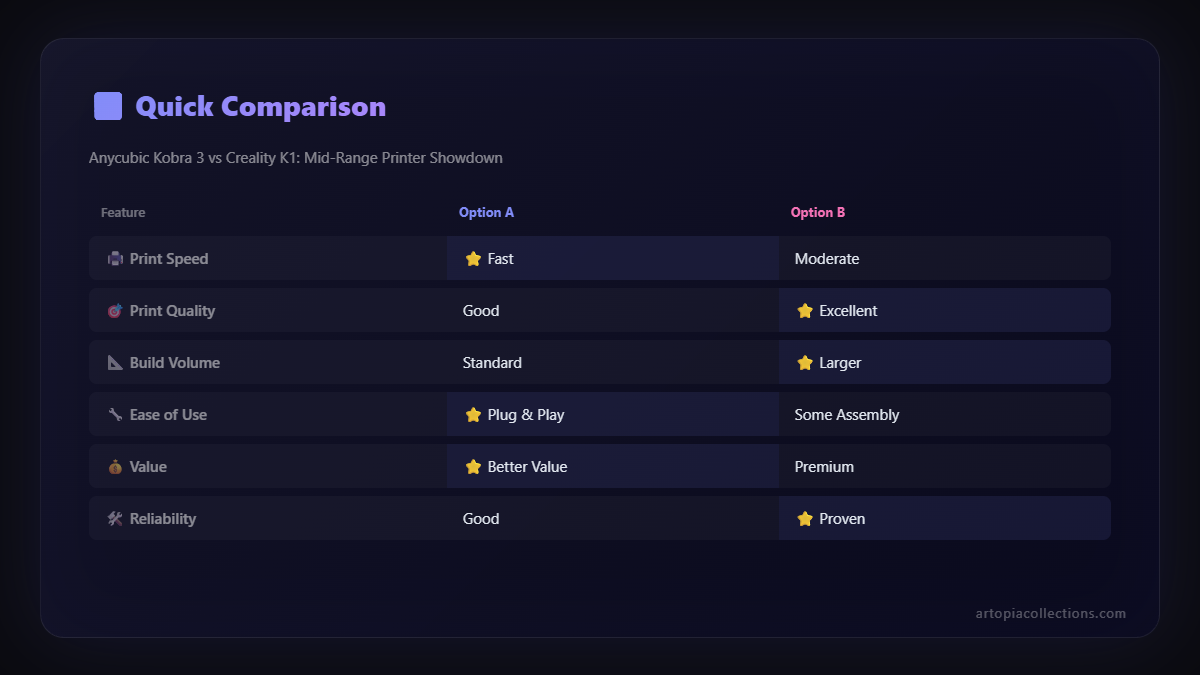
K1 wins, hands down. If raw speed is your number one priority, the K1 will blow the Kobra 3 out of the water. For batch production, or printing those huge functional prototypes where every hour counts, the K1 is a beast. But don't misunderstand, the Kobra 3 isn't slow. It's just that the K1 is in another league when it comes to sheer velocity. For many daily prints, the Kobra 3âÂÂs speed is more than enough, and its quality at that speed is arguably better for very fine details.
Ease of Use & Setup:
Kobra 3 takes the crown here. From unboxing to your first successful print, the Kobra 3 is a smoother, more forgiving experience. The auto-leveling is practically flawless, and its overall interface feels more refined for a new user. The K1, while improving, still requires a bit more patience and troubleshooting know-how.
Print Quality:
This is tricky, because both are excellent. For general PLA and PETG prints, especially aesthetic ones, I'd say the Kobra 3 might have a slight edge in out-of-the-box consistency for visual appeal, simply because itâÂÂs not pushing the limits as much. However, for tough materials or very specific dimensional accuracy with engineering filaments, the K1's enclosed chamber and rigidity can deliver superior results, particularly with materials like ABS or ASA where temperature stability is key. If you tune the K1 perfectly, its quality is phenomenal, but it takes more effort.
Materials & Versatility:
K1 pulls ahead thanks to its enclosed chamber. This isn't just a small advantage; it's a huge one if you ever plan to print with anything beyond PLA, PETG, and flexible filaments. The ability to print high-temperature materials without worrying about drafts or uneven cooling opens up a whole new world of applications for my business. The Kobra 3 needs an external enclosure for this, which, trust me, is not always elegant or convenient.
Reliability & Maintenance:
In my experience, the Kobra 3 has been more consistently reliable out of the box. Fewer early issues, fewer unexpected clogs. The K1 has improved significantly with firmware updates, but those early days were a bit of a gamble. However, once the K1 is dialled in, it's also a robust machine. Maintenance on both is fairly standard â nozzle changes, bed cleaning, occasional lubrication. But the Kobra 3 just felt less "needy" in its initial months.
Community & Support:
Both Anycubic and Creality have massive communities, especially in India. YouâÂÂll find Facebook groups, Telegram channels, and local distributors for both. So, support isnâÂÂt really a deciding factor here. However, Creality's sheer user base means thereâÂÂs often a solution to any obscure problem you encounter with the K1 just a Google search away.
Who Should Buy Which Printer for Their Indian Workshop?
HereâÂÂs the deal, after spending quality time with both these fantastic machines:
Go for the Anycubic Kobra 3 if:
- You prioritize ease of use and a smooth, consistent experience. You want to press print and get good results without constant tinkering.
- Your primary materials are PLA, PETG, and some TPU. You don't frequently need to print with high-temperature, warp-prone materials.
- You're upgrading from an entry-level printer and want a significant boost in speed and quality, but not necessarily the absolute fastest. ItâÂÂs a fantastic bridge to the "prosumer" level.
- Your projects are more focused on aesthetic prints, figurines, or standard functional parts.
- You value quiet operation (relatively speaking!) more than absolute top speed.
Pick the Creality K1 if:
- Raw speed is paramount for your workflow. You need to churn out prints quickly for rapid prototyping or batch production.
- You regularly print with engineering-grade filaments like ABS, ASA, Nylon, or even Carbon Fiber composites. The enclosed chamber is a huge benefit here.
- You're comfortable with a bit of tinkering and troubleshooting. You don't mind diving into settings, flashing firmware, or optimizing profiles.
- You're looking for the absolute best performance-to-price ratio for a high-speed coreXY machine.
- Your workshop can handle the increased noise levels, or the printer will be in a separate area.
My Personal Verdict & Business Application
For my business, Artopia Collections, both printers actually have a place. If I had to pick just one, it would depend on the *type* of work I'm focusing on at that moment. For quick, high-volume orders of functional prototypes or parts that need to withstand a bit more heat or stress, the K1 is my go-to. Its speed is undeniable, and the enclosed chamber is a godsend for materials I often use in those contexts.
But for those delicate, highly detailed aesthetic pieces â custom statues, intricate decor, prototypes where surface finish is critical â the Kobra 3 often gets the nod. It's just so reliably good at producing beautiful prints with minimal fuss. And honestly, for a lot of my customer orders for decorative pieces, the Kobra 3âÂÂs speed is more than sufficient, and its consistency means fewer failed prints, which equals less wasted PLA filament (which we source from brands like FilaCube and 3DMart locally, sometimes eSUN from Amazon).
So, there you have it, folks. ItâÂÂs not a simple "winner takes all" situation. Both the Anycubic Kobra 3 and the Creality K1 are phenomenal machines that represent excellent value in the mid-range segment for us here in India. Your choice boils down to your specific needs, your willingness to tinker, and the types of prints you'll be making most often.
Whichever you choose, you're getting a powerful tool that will significantly elevate your 3D printing game. Happy printing, and don't forget to check out some of the cool stuff we're making over at Artopia Collections!
Got thoughts? Questions? Which one would you pick? Drop a comment below, I'd love to hear your experiences!


