Best Multi-Color 3D Printers in 2026: AMS vs MMU Compared
Looking for the best multi-color 3D printer in 2026? This guide compares the leading AMS and MMU technologies to help you decide which system is right for your vibrant creations.

Chalo, let's talk about something truly magical in the 3D printing world, something that just *transforms* a print from "nice" to "WOW!" â multi-color printing. Seriously, when I first started my little 3D printing business, ArtTopia Collections, right here in the heart of India, I was mostly churning out single-color functional prints and simple prototypes. And that was cool, don't get me wrong. But the moment I delivered my first true multi-color piece, seeing the client's eyes light up? That's when I knew this was the future. It's like going from black and white TV to full HD 4K, you know? It just adds a whole new dimension, a personality, to your prints.
For me, it wasn't just about aesthetics. My clients, especially the ones wanting custom miniatures, detailed logos, or even vibrant art pieces, they *demanded* color. And honestly, for a long time, achieving consistent, high-quality multi-color prints was⦠well, it was a headache. A proper, banging-your-head-against-the-wall kind of headache. Filament changes, nozzle clogs, color bleeding â the works. But good news, folks! We're in 2026 now, and the tech has gotten so much better. The two big players, the ones everyone talks about, are Bambu Lab's AMS and Prusa's MMU. And today, we're gonna dive deep into them, compare them head-to-head, and figure out which one might be right for your setup, especially here in our Indian market.
The Quest for Color: Why it Matters
Before we get into the nitty-gritty of the hardware, let's just quickly touch upon *why* multi-color printing is such a big deal. For a small business like mine, it opens up so many avenues. We've done custom desk organizers with company logos in their brand colors, intricate architectural models where different materials or sections need distinct identification, and even just fun, vibrant toys that simply wouldn't have the same appeal in a single shade. It allows for a level of detail and artistic expression that was previously limited to very expensive industrial machines or extensive post-processing (painting, anyone?). And let me tell you, painting those tiny details by hand? My eyes aren't getting any younger, so automation is a blessing!
Plus, in a competitive market like ours, offering something unique, something visually striking, really helps you stand out. That's why I've invested heavily in understanding these systems, because offering multi-color prints has genuinely expanded what ArtTopia Collections can do. You can check out some of the cool stuff we've made, including multi-color pieces, right here on our website.
Automatic Material System (AMS): The Bambu Lab Game Changer
Alright, let's kick things off with the big one that pretty much disrupted the entire 3D printing scene: Bambu Lab's AMS. When Bambu Lab burst onto the scene a few years ago, everyone was talking about their speed and print quality, but the AMS was the real showstopper for many. It's an enclosed, smart unit that sits on top or beside your Bambu Lab printer (like the X1 Carbon, P1S, or even the A1 Mini with its mini AMS). It typically holds four spools of filament, though you can daisy-chain up to four units for a whopping 16 colors! Think about that for a second â sixteen different colors in one print, automatically. Madness!
How the AMS Works Its Magic
The core idea of the AMS is seamless, automated filament switching. Each spool sits in its own slot, with sensors detecting filament presence and type (RFID tags on Bambu spools, but it works with most standard spools too). When your print needs a color change, the AMS automatically retracts the current filament, cuts it, feeds it back into its slot, and then pulls in the next color. All of this happens *inside* the AMS, which helps keep the filament dry and reduces tangles. The printer then purges the old color from the nozzle â usually into a waste tower â and starts printing with the new one. It's incredibly elegant.
My Experience with Bambu Lab + AMS
I personally run a couple of Bambu Lab P1S machines with AMS units, and honestly, they've been an absolute workhorse for my business. The reliability is just off the charts compared to what I was used to. I can set up a complex multi-color print, go grab a chai, and come back to see it humming along. The speed is phenomenal too, which is critical when you're trying to fulfill orders. For example, a detailed, multi-color figurine that might have taken 10-12 hours on an older setup with manual changes, or even 15-20 hours on an MMU, can often be done in 6-8 hours on a P1S with AMS. That's a huge difference in turnaround time and profitability.

Pros of the AMS:
- Unmatched Reliability: This is the biggest one. Fewer clogs, fewer missed filament loads. It just works.
- Ease of Use: Load your spools, tell the slicer what colors are where, and hit print. The software integration is top-notch.
- Speed: Bambu Lab printers are fast to begin with, and the AMS doesn't significantly slow down the actual printing time, only adding a short purge/change cycle.
- Filament Management: Keeps filaments dry and organized within its enclosed system.
- Multi-Material Capabilities: While primarily for colors, it can also switch between different material types (PLA, PETG, ABS, even some flexibles â though flexibles can be tricky).
Cons of the AMS:
- Cost: It's an investment. A Bambu Lab P1S Combo (with one AMS) will set you back around â¹1,00,000 - â¹1,20,000 in India, and an X1 Carbon Combo even more, often â¹1,30,000 - â¹1,50,000. Each additional AMS unit is roughly â¹25,000 - â¹30,000. That's not small change for a small business here.
- Filament Waste (Purge Tower): To ensure clean color transitions, the printer prints a "purge tower" which is basically wasted filament. For very intricate multi-color prints, this tower can sometimes be nearly as big as your actual print!
- Proprietary Feel: While it now supports most standard filaments, initially there was a push towards Bambu Lab's own RFID-tagged spools. This isn't a huge issue anymore, but it's something to note.
- Limited Filament Types: While it handles many, very abrasive or extremely flexible filaments can be problematic due to the AMS's internal pathing.
For me, the cost is justified by the reliability and speed. Time is money, especially when dealing with client deadlines. If you're looking for a hassle-free, business-ready multi-color solution, a Bambu Lab machine with an AMS is a very strong contender. You can find their printers and accessories on various Indian resellers or sometimes directly via their website, or just search for "Bambu Lab AMS" on Amazon.in to see if any local sellers have them.
Multi-Material Upgrade (MMU): Prusa's Open-Source Challenge
Now, let's shift gears and talk about Prusa's Multi-Material Upgrade, or MMU. Prusa Research, led by Josef Prusa, is known for its open-source philosophy, rock-solid engineering, and a fantastic community. The MMU is their answer to multi-color printing, primarily designed for their i3 series printers (like the legendary MK3S+ and the newer MK4). The current iteration is the MMU3, which has seen significant improvements over its predecessors.
How the MMU Navigates Colors
The MMU works differently from the AMS. Instead of an enclosed box, it's typically an add-on module that sits on top of your printer's frame. It handles up to five filaments. When a color change is needed, the MMU physically unloads the current filament from the extruder, cuts it (using a blade in the unit), and then loads the next chosen filament into the extruder. This process involves a series of sensors and motors to ensure accurate feeding and retraction. The filament path is a bit more exposed than the AMS, which can have its own set of challenges.
My Journey (and Struggles) with MMU
Back in the day, before Bambu Lab was even a whisper, the Prusa MMU2S was the gold standard for many hobbyists wanting multi-color. I actually had an MK3S+ with an MMU2S. And look, I'm going to be completely honest here: it was a love-hate relationship. When it worked, it produced beautiful prints. But getting it to work consistently? Oh boy. It required a *lot* of calibration, tweaking, and patience. Filament jams, missed loads, stringing during changes â I had my fair share of those hair-pulling moments. It felt like I was spending as much time debugging as I was printing.
The MMU3, from what I've heard and seen from community feedback, is a much more refined and reliable unit. Prusa has done a lot of work to improve the sensors and the filament path. But it still retains some of the inherent complexities of its design.
Pros of the MMU:
- Open Source: This is huge for many. You can understand how it works, modify it, and benefit from a massive community constantly improving things.
- Cost (if you already own a Prusa): If you already have a Prusa MK3S+ or MK4, buying just the MMU3 module is significantly cheaper than buying a whole new Bambu Lab setup. The MMU3 module itself might cost around â¹30,000 - â¹40,000 if purchased separately here in India (prices can vary greatly based on import duties and availability).
- Filament Compatibility: Generally, because the filament path is less constrained, the MMU is often more forgiving with a wider range of filaments, including some slightly softer or more abrasive ones.
- Upgrade Path: It's an upgrade for an existing, already reliable printer.
Cons of the MMU:
- Reliability (Historically): While improved with MMU3, it generally still requires more user intervention and fine-tuning than an AMS. It's not as "set it and forget it."
- Print Speed: Prusa printers are fantastic, but generally not as fast as Bambu Lab machines. The MMU process itself also adds more pauses and retractions, extending print times significantly compared to single-color prints.
- Learning Curve: Definitely steeper. Be prepared to tinker.
- Filament Waste: Like the AMS, it uses a purge tower, resulting in filament waste.
- More Exposed Filaments: Filaments are generally exposed to the environment, meaning you might need external dry boxes, especially in humid Indian climates.
The MMU, especially with the MK4, is a solid choice for the hobbyist, the tinkerer, or someone deeply invested in the Prusa ecosystem who loves to get under the hood. For someone running a business, the downtime for maintenance and troubleshooting can be a real killer, so that's something to weigh carefully.
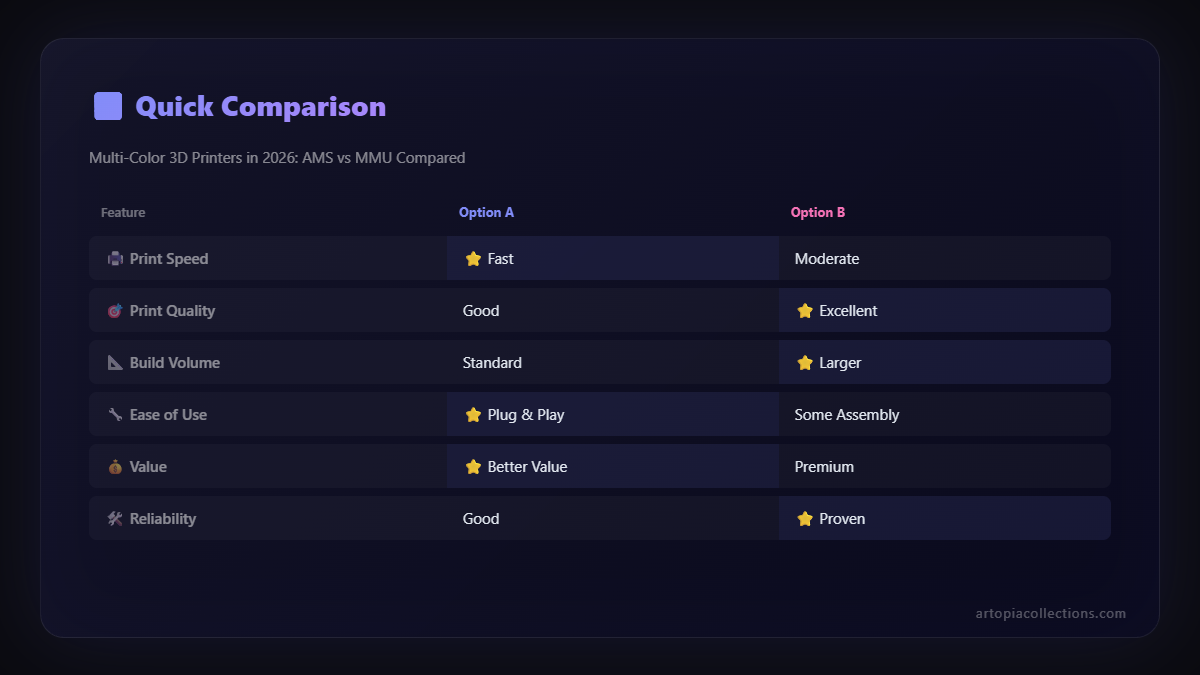
AMS vs MMU: The Head-to-Head Showdown (My Take)
Alright, so we've looked at them individually. Now, let's put them side-by-side, based on my personal experience and what I've observed in the community:
1. Reliability & Consistency
AMS Wins. Hands Down. This is where Bambu Lab truly shines. The enclosed system, the precise sensors, and the well-integrated software just make for a much more reliable experience. You press print, and it usually just works. For a business, this translates directly to fewer failed prints, less wasted filament, and happier clients.
The MMU, even the MMU3, still has a reputation for being a bit finicky. It's gotten better, but it's not on the same level of "just works" as the AMS.
2. Ease of Use & Learning Curve
AMS Wins Again. Setting up a Bambu Lab printer with an AMS is surprisingly straightforward for the power it offers. The slicer (Bambu Studio) is intuitive with its multi-color painting tools. You pick your colors, assign them to filaments, and you're good to go.
The MMU, while not impossible, has a steeper learning curve. From assembly (if you get the kit) to calibration, to understanding the purge settings, it demands more attention. If you're new to multi-color, the MMU can be intimidating.
3. Print Speed
Bambu Lab + AMS Wins. Bambu Lab printers themselves are inherently faster than most Prusa i3 series machines. The AMS also performs filament changes very efficiently. While multi-color printing will always be slower than single-color due to purges, the Bambu combo minimizes this impact.
MMU adds a significant overhead to print times, both because the underlying Prusa printers are a bit slower, and the change process itself can be more involved.
4. Filament Compatibility & Flexibility
MMU Has a Slight Edge. Because the MMU's path is less constricted and its operation is less "smart" about filament type (it just loads what you tell it), it *can* handle a slightly broader range of materials, especially some more exotic or very flexible ones, without much fuss. However, you'll still need to dial in settings for each. For general PLA, PETG, ABS, ASA â both are excellent.
The AMS, while greatly improved, can sometimes struggle with extremely soft flexibles or very brittle filaments. For common materials like eSUN PLA+, Overture PETG, or Indian brands like 3DPrintz or Techgon, both work perfectly fine.
Pro-tip: invest in a good filament dryer for any multi-color setup, especially in our humid Indian weather! It makes a massive difference for print quality and reliability. I personally use something like a Sunlu S2 dryer, you can find similar ones here: Amazon.in Filament Dryer.
5. Cost & Value for Money
This is tricky.
Upfront Cost: If you *don't* own a Prusa printer, then a new Prusa MK4 + MMU3 combo might come in slightly cheaper than a Bambu Lab X1C Combo, but potentially comparable to a P1S Combo (remember, these are estimates, actual prices vary wildly in India due to imports).
Total Cost of Ownership: This is where I think the AMS pulls ahead for a business. While the initial investment might be higher for an X1C Combo, the reduced failure rates, less wasted filament due to failed prints, and faster print times mean better ROI in the long run. Less troubleshooting means more time *printing* and less time *fixing*.
6. Community & Open Source
MMU / Prusa is the Undisputed King. If you love tinkering, modifying, and being part of a vibrant, open-source community that shares everything, Prusa and the MMU are for you. The documentation, forums, and user-generated improvements are incredible.
Bambu Lab is more of a closed ecosystem. While their support is good, and their software is excellent, you won't find the same level of open-source tinkering or community modifications for the hardware itself.
My Verdict for 2026: What I Recommend
Look, if you're asking me, someone who runs a small business and needs reliable, consistent multi-color prints with minimal fuss, then Bambu Lab's AMS is the clear winner for most people. The ease of use, the incredible reliability, and the sheer speed make it an absolute powerhouse for commercial applications or for hobbyists who just want to print beautiful things without constant babysitting.
However, if you're an existing Prusa owner, love to tinker, enjoy solving problems, and appreciate the open-source philosophy, then the MMU3 for your Prusa MK4 is a genuinely viable and rewarding option. It's come a long way, and for those who enjoy the journey as much as the destination, it offers a lot of satisfaction.
Ultimately, both systems represent incredible advancements in multi-color 3D printing. The choice depends on your priorities: do you value seamless, hands-off reliability (AMS) or do you enjoy the challenge and open-source nature (MMU)? For my ArtTopia Collections business, the AMS has been a game-changer, allowing me to focus on design and client satisfaction rather than debugging hardware. What's your take? Drop a comment below!


