How to Use Shopify Print-on-Demand Apps for 3D Printed Products
Discover how to integrate 3D printed products into your Shopify store using powerful print-on-demand apps. This guide explores the best solutions for design, fulfillment, and selling unique custom items without managing inventory.

From Garage Hobby to Global Dreams: How Shopify Print-on-Demand Apps Can Revolutionize Your 3D Printing Business
Man, I remember those days. Staring at my Ender 3 (the OG, you know?), watching it meticulously lay down layer after layer, a little piece of my design slowly coming to life. That pure joy? Unmatched. But then the orders started coming in – friends, family, local folks on Instagram. And suddenly, my little hobby corner felt less like a creative haven and more like a bottleneck. Printing, post-processing, packing, shipping, handling customer queries… it was a never-ending cycle, and I honestly felt like I was drowning in PLA dust.
I mean, we 3D printing enthusiasts, we’re a different breed, right? We love the tinkering, the designing, the smell of warm filament. But running a business? That’s a whole other ball game. And here’s the deal: for a long time, I thought if I wanted to scale Artipia Collections (yeah, that's my small business, pretty neat, huh? You can check out some of my designs right here!), I’d need a whole farm of printers, a dedicated workshop, and maybe a small army of elves. The thought of the upfront investment for inventory, especially for custom designs, was enough to make my head spin. I just couldn't risk printing 50 units of a new design only for it to sit in a box for months.
So, I started looking for ways to streamline. I'd heard about print-on-demand (POD) for t-shirts and mugs, but for 3D printing? That felt like sci-fi. Most traditional POD services don't touch 3D prints, or if they do, the options are super limited and often really expensive. But I wasn't going to give up. I knew there had to be a way to leverage the power of online platforms without losing the magic of personalized, 3D printed goods. And that’s when I realized the potential of Shopify combined with a smart, slightly unconventional approach to POD apps.
What Even IS Print-on-Demand for 3D Prints, Really?
Okay, let's be super clear here, because it's not exactly like ordering a custom t-shirt from Printful or Printify. Those services have warehouses full of blank tees and industrial printers ready to go. For 3D printing, it's a bit more nuanced. Basically, a true 3D printing POD service would mean you design a product, upload the 3D model (usually an STL file), and when a customer orders it, a third-party company prints it for them and ships it directly, all under your brand. Services like Shapeways or Sculpteo do this to some extent, but they often have their own storefronts or integrations that aren't always seamless with a Shopify setup if you want full brand control.
The way *I'm* talking about it – and what's more practical for small Indian 3D printing businesses like mine – is more about using Shopify's POD *workflow* and apps to manage orders, payment, and product presentation efficiently, even if *you're* the one doing the actual printing. It’s about creating a system where the product only gets made *after* it's sold. This drastically reduces your inventory risk and frees up your time from managing stock. And if you *do* find a local partner or a small printing hub, these apps can still facilitate the order flow to them.
Why Shopify is Your Best Friend (Even Without a Dedicated 3D Print POD App)
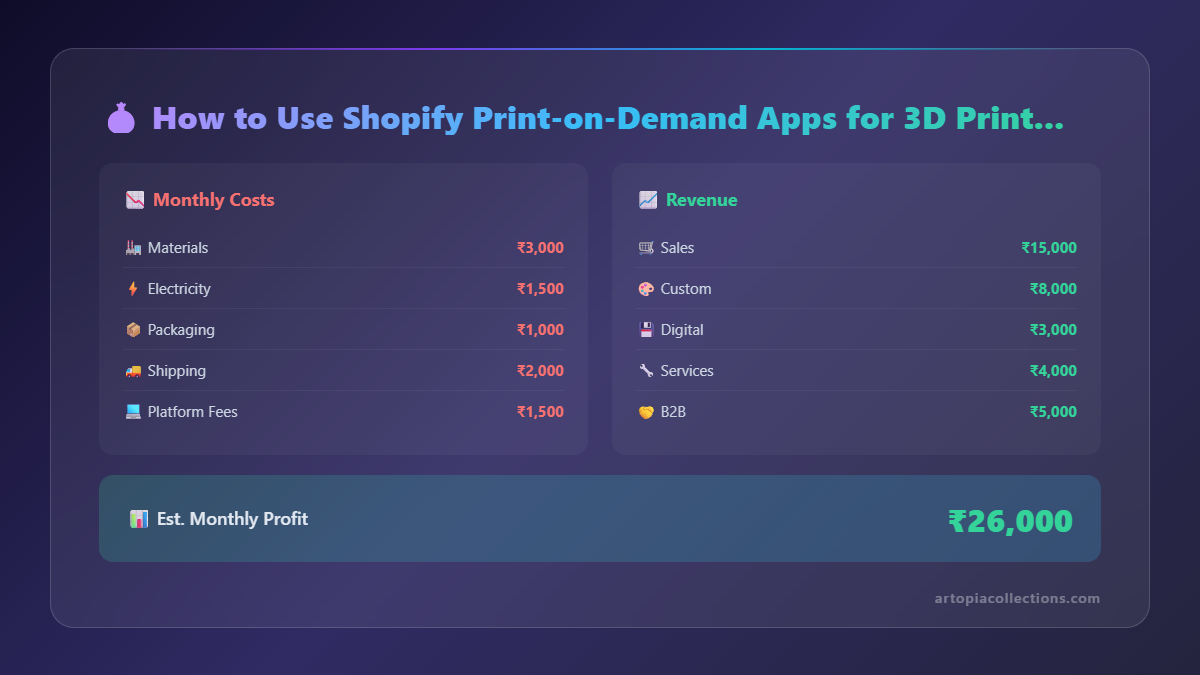 Look, Shopify isn't just a platform; it's an ecosystem. It's incredibly user-friendly, secure, and has a vast app store that can pretty much customize your store to do anything. For us 3D printing folk, it's perfect because:
- Easy Setup: You don't need to be a coding wizard. Seriously, I'm decent with Cura, but HTML? Not so much. Shopify makes it drag-and-drop simple.
- Scalability: As your business grows, Shopify grows with you. No need to migrate platforms later.
- Payment Gateways: It integrates with pretty much all major payment options in India, like Razorpay, PayU, and of course, standard card payments. This makes it super easy for customers.
- App Store: This is where the magic happens for our pseudo-POD approach.
So, How Do You Set Up a "3D Print POD" Workflow on Shopify?
Alright, let’s get down to brass tacks. This is where it gets interesting. Since there isn't a "Printful for 3D prints" that perfectly integrates into Shopify for custom *your-brand* items (yet!), we adapt. Here’s how I've seen it work, and how I've implemented elements of it:
1. The Design & Mockup Phase: Your Digital Inventory
This is where your creativity shines. Instead of printing dozens of units, you design your product in Fusion 360, Blender, SolidWorks, whatever you use. Once the design is finalized, you create high-quality renders. These renders are crucial. They're your "product photos" that customers will see. I personally use Blender for my renders because it’s free and powerful, and you can make them look super realistic, even showing different filament colors or finishes.
Pro Tip: Invest time in learning good rendering. A stunning mockup sells far better than a blurry phone photo of a prototype.
2. Creating Your Shopify Product Listings
Now, here's where it ties into the "POD" concept. You create a product listing for each design on Shopify. Use your beautiful renders as product images. For variants (different sizes, colors, materials), you list those out. For example, a phone stand could come in PLA, ABS, or even PETG, and in different colors. The key is that these don't exist as physical stock yet.
When someone orders, the order automatically comes into your Shopify admin. This is where the "on-demand" part kicks in for *your* internal process. Instead of grabbing it from a shelf, you queue it for printing.
3. The "POD App" Integration (or Workflow Automation)
This is probably the trickiest part to explain simply because it's not a one-size-fits-all solution like for t-shirts. Here are a couple of approaches:
a) Using a "Custom Product Builder" or "Product Options" App:
Apps like Infinite Options, Product Options and Customizer, or Bold Product Options can be incredibly powerful. They allow customers to customize their orders – maybe they want a specific text engraved, or a unique color blend, or a different size not listed as a standard variant. When they place the order, all these custom details are attached to the order. This is perfect for 3D printing because we often offer unique customizations. I mean, who wants a generic nameplate when you can have one with your specific gamer tag, right?
When an order with custom options comes in, you get all the details needed to tweak your STL, slice it, and print it. This automates the *information gathering* part of "print on demand."
b) Leveraging Fulfillment Apps for Internal Management:
Some fulfillment apps, while designed for warehousing, can be adapted. Or even simpler, you can use Shopify's built-in order management as your "queue." When an order comes in, you change its status to "awaiting fulfillment," print it, then mark it as "fulfilled" and add tracking. It’s basic, but it’s a POD workflow.
c) Partnering with a Local 3D Printing Hub:
This is the closest to traditional POD. If you've found a reliable local 3D printing service in India that can white-label (print and ship under your brand) and you've negotiated rates, you can use an app like Order Printer Pro to automatically generate a packing slip or order manifest to send to them. You'd set up an email notification or use an integration to forward orders directly. It requires some manual setup, but it automates the dispatching of print jobs.
4. The Printing & Post-Processing Phase
Once an order comes in, you get to work! Fire up your Prusa i3 MK3S (what a workhorse!) or your Anycubic Kobra Max (great for bigger stuff). Load up your chosen filament – for most of my functional and decorative prints, I swear by eSun PLA+ or Extrudr NX2. Both are available on Amazon.in and are fantastic quality, especially the eSun for general purposes. You can find a good selection of colours and materials here: PLA Filament on Amazon.in. It really makes a difference in the final product finish.
Print the item, do your post-processing (sanding, painting, assembly – whatever your product requires), and make sure it meets your quality standards. This is your brand's reputation, after all.
5. Packing and Shipping – The Indian Way
This is where local knowledge comes in handy. You’ll need good quality packaging to protect your prints. I use a mix of corrugated boxes and bubble wrap, maybe some shredded paper for aesthetics. For shipping, I've had good experiences with Delhivery and Blue Dart for reliability, though India Post sometimes offers good rates for smaller, less time-sensitive items. Make sure your shipping rates are clear on your Shopify store. You can even use Shopify's built-in shipping calculations or integrate with specific courier apps.
Remember, transparent shipping costs and delivery times are super important for Indian customers. We’re used to fast deliveries, thanks to e-commerce giants, so manage expectations.
Benefits I've Experienced Using This "Pseudo-POD" Method
- Zero Inventory Risk: This is massive. No more worrying about unsold stock gathering dust. You print only what's sold.
- More Design Freedom: I can experiment with new designs without the pressure of needing to sell a huge batch. If it doesn't get many orders, no biggie!
- Focus on Quality: Since each item is printed on demand, I can personally oversee the quality of every single piece that goes out. This is a huge advantage over mass-produced items.
- Customization King: This model is inherently perfect for custom 3D printed items. Each order can be unique.
- Easier Scaling (Slowly): While I still do the printing myself, the order management is automated. As orders increase, I can invest in another printer (like this fantastic Anycubic Kobra Go which is great value for money if you're starting out or expanding!) or even bring in an assistant for post-processing, gradually scaling my production capacity without a huge leap of faith.
Challenges? Oh, You Bet!
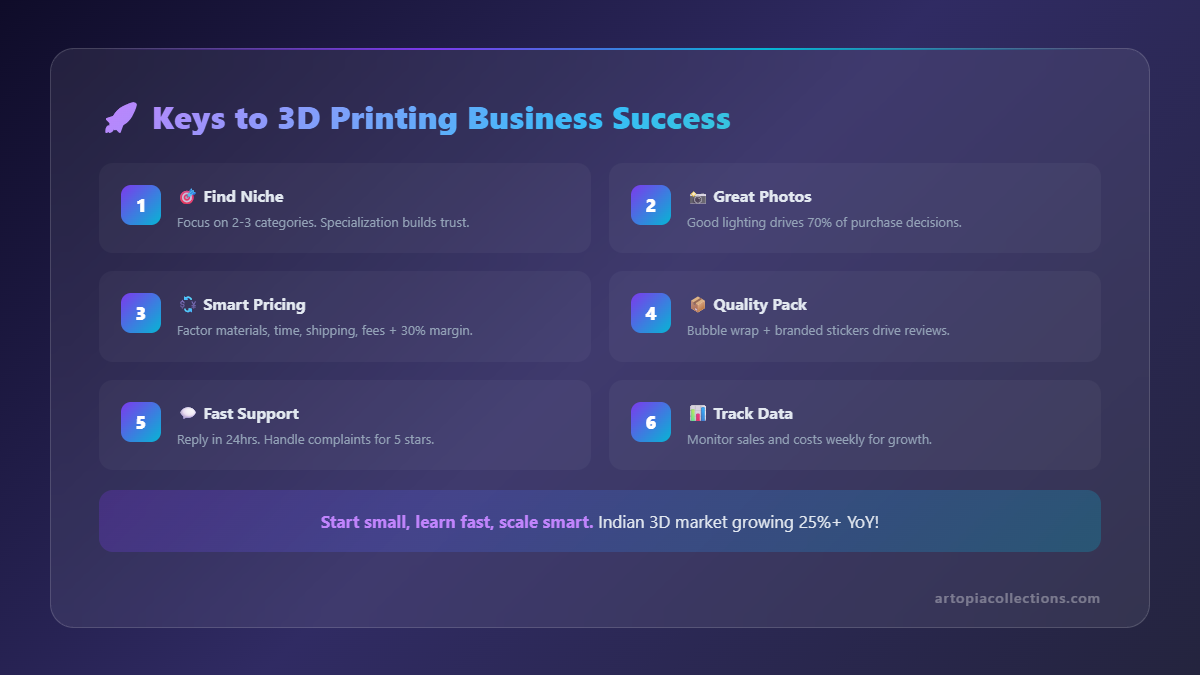 It's not all rainbows and perfectly flat first layers, my friends. There are challenges:
- Time Commitment: You're still doing the printing. So, while order *management* is automated, production time is still yours.
- Finding Reliable Partners: If you *do* try to outsource, finding a local 3D printing service that offers consistent quality, fair pricing, and reliable white-label shipping is tough in India. It's a relationship you need to build carefully.
- Consistent Quality: Even if you're printing, machine calibration, filament consistency, and environmental factors can affect print quality. You need strict QC.
- Pricing: Figuring out how to price your items to cover filament, electricity, machine wear-and-tear, post-processing time, and profit is an art. Don't undersell yourself! My time is valuable, and so is yours.
My Advice from the Trenches
If you're thinking of diving into this, here’s what I’d tell my past self:
- Start Small, Learn Fast: Don't try to offer 50 different products right away. Pick 3-5 strong designs, optimize their listings, and get a feel for the process.
- Niche Down: What are you passionate about printing? Gaming accessories? Home decor? Practical tools? A clear niche helps you target customers.
- Invest in Your Renders: Seriously, I can't stress this enough. Good visuals are half the battle.
- Clear Communication: If there's a delay, tell your customer. If it's a custom order, confirm the details. Transparency builds trust.
- Always Be Learning: New filaments, new printers, new software, new Shopify apps – the 3D printing and e-commerce worlds are always evolving. Keep experimenting.
Ultimately, using Shopify and its array of apps for a 3D printing business, even without a dedicated "3D Print POD" service, is about smart workflow automation. It lets you focus on what you love – designing and creating – while the platform handles the nitty-gritty of selling. It’s not a magic bullet, but it’s a powerful tool to turn your passion project into a sustainable business, right here in India. So, what are you waiting for? Let's get printing (and selling)!


