3D Printing for Beginners: Everything You Need to Know Before Your First Print
New to 3D printing and eager to start? This comprehensive guide walks you through everything you need to know before attempting your very first 3D print, ensuring a smooth and successful experience.
Ever gazed at an intricate model, a custom part, or even a whimsical toy and thought, "Man, I wish I could just⦠make that"? Well, my friend, that's exactly how I felt years ago, and that feeling led me down the incredible rabbit hole of 3D printing. It's not just some futuristic tech from sci-fi movies anymore; it's right here, accessible, and honestly, a game-changer for makers, hobbyists, and even small businesses like mine, ArtOpia Collections. You're probably standing at the precipice of this amazing journey, and that's awesome! But before you dive headfirst into buying your first machine and a spool of plastic, let's talk. There are a few things you absolutely, positively need to know to make sure your first print isn't your last, driven by frustration.
So, What Even IS 3D Printing, Really?
Okay, let's cut through the jargon. At its heart, 3D printing is basically additive manufacturing. Instead of carving away material like traditional methods, you're building an object layer by incredibly thin layer, from the ground up. Think of it like a hot glue gun that moves with insane precision, following a digital blueprint. Most beginners, and honestly, most hobbyists and small businesses, start with something called FDM (Fused Deposition Modeling) printers. This is what we're mostly going to talk about today.
An FDM printer takes a plastic filament (imagine a long string of plastic) and feeds it through a heated nozzle. This nozzle melts the plastic and extrudes it onto a build plate in a precise pattern. Layer by layer, the object slowly takes shape. ItâÂÂs mesmerizing to watch, I tell you! And the possibilities? Endless. From custom phone stands to replacement parts for your mixer, or even cool desk toys â you can make almost anything.
Why Should YOU Get Into 3D Printing?
This is where it gets personal. Why did *I* start? Because I love creating. And the instant gratification of seeing an idea materialize from a screen into a physical object? Unbeatable. But beyond my personal obsession, there are so many reasons you might want to jump in:
- Hobbies: If you're into models, cosplay, miniatures, or just love tinkering, a 3D printer is your new best friend.
- Problem Solving: Broken clip on your washing machine? Design and print a new one. Need a custom organizer for your desk? Boom!
- Education: Great for kids and adults alike to learn about design, engineering, and manufacturing.
- Small Business: This is my bread and butter! I make custom gifts, prototypes, and unique home decor. You can totally turn this into a side hustle or even a full-time gig. We offer a whole range of custom designs, actually, you can see some of what we do right here at Artopia Collections.
The thing is, it's not just about printing existing models. It's about bringing *your* ideas to life. That's the real magic.
Choosing Your First Printer: The Great Indian Market
Okay, this is probably the biggest hurdle for most beginners. The market is flooded! And honestly, it can be overwhelming. But don't you worry, I've got your back. In India, we've got access to some fantastic, budget-friendly options that are perfect for starting out.
FDM vs. Resin: Keep It Simple, Stupid (for now!)
First off, you'll hear about two main types: FDM and Resin (SLA/DLP). For beginners, stick to FDM. Resin printers offer incredible detail, but they are messier, require more post-processing, use more toxic resins, and frankly, they're a bigger investment in both money and effort. FDM is safer, cleaner, and perfect for learning the ropes. Trust me on this one.
Budgeting for Your Buddy (the Printer, I mean)
When I started, printers were pretty expensive. But now? You can get a genuinely good starter machine for around â¹15,000 to â¹30,000. Going cheaper might seem tempting, but you often sacrifice features, reliability, and support. Going much higher is probably unnecessary for your first machine.
Popular Entry-Level Printers in India (My Recommendations!)
In my experience, these are the workhorses that most people start with, and for good reason:
- Creality Ender 3 Series: This is almost a rite of passage for 3D printing enthusiasts. The Ender 3 V2, or even the newer Ender 3 V3 SE, are phenomenal value for money. They're reliable, have a huge community for support, and there are tons of upgrade options. You can find them on Amazon.in, often for around â¹18,000-â¹25,000 depending on the model and ongoing offers.
- Anycubic Kobra Go/Neo: Anycubic has really stepped up its game. The Kobra series offers some fantastic features for the price, like auto-bed leveling (a HUGE convenience for beginners, we'll talk more about this later) and direct drive extruders. Prices are similar to the Ender series.
- Elegoo Neptune Series: Another strong contender, especially the Neptune 3 Pro or Neptune 4. Elegoo is well-known for its resin printers, but their FDM machines are quickly gaining popularity for their ease of use and solid performance.
Look, any of these will serve you well. I personally started with an Ender 3 Pro and it taught me everything I needed to know. The most important thing is to pick one, do a little research on that specific model, and commit!
You can browse some great entry-level 3D printers right here: Entry-Level 3D Printers on Amazon.in
Key Features to Look For (Don't Get Bogged Down!)
For your first printer, keep an eye out for these:
- Auto Bed Leveling: Seriously, this is a lifesaver. Manual bed leveling can be frustrating for new users.
- Build Volume: The size of prints you can make. For beginners, a 220x220x250mm cube is standard and perfectly adequate. You don't need a huge printer right away.
- Direct Drive Extruder: The extruder (the part that pushes the filament) is right above the hot end. This is generally better for flexible filaments later on and can give more consistent results. Bowden extruders are fine too, don't get me wrong, just something to consider.
- Open Source: Most of these budget printers are open source, meaning a massive community and easy access to parts and upgrades.
Essential Supplies & Tools: Don't Skimp Here!
Your printer isn't an island. You'll need some consumables and tools. Think of it like buying a car; you also need fuel and a toolkit!
Filament: Your Printer's Food
This is the plastic string your printer melts. For beginners, there's one material you absolutely *must* start with: PLA (Polylactic Acid). Why? It's:
- Easy to Print: Very forgiving with temperatures and settings.
- Low Odor: Doesn't stink up your room like some other plastics.
- Bio-Derived: Made from renewable resources like corn starch.
Once you're comfortable with PLA, you can experiment with PETG (stronger, more temperature resistant, good for functional parts) or TPU (flexible, like rubber). But seriously, start with PLA. A good 1kg spool will cost you around â¹800-â¹1500, depending on the brand and color. Brands like eSun, Overture, Eryone, and even some local Indian brands offer excellent quality.
Stock up on some good quality PLA filament here: PLA Filament on Amazon.in
Adhesion Aids: Keeping Your Print Stuck!
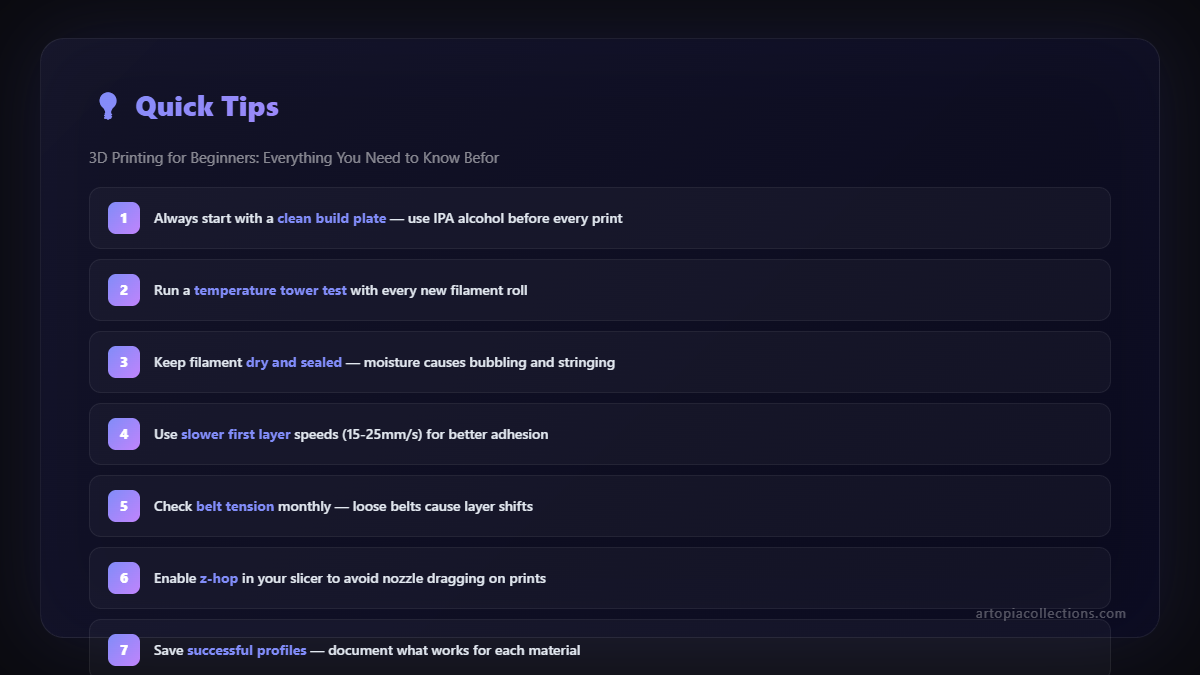
Your first layer sticking to the print bed is arguably the most critical part of a successful print. If it doesn't stick, your print will fail, guaranteed. Here's what I use:
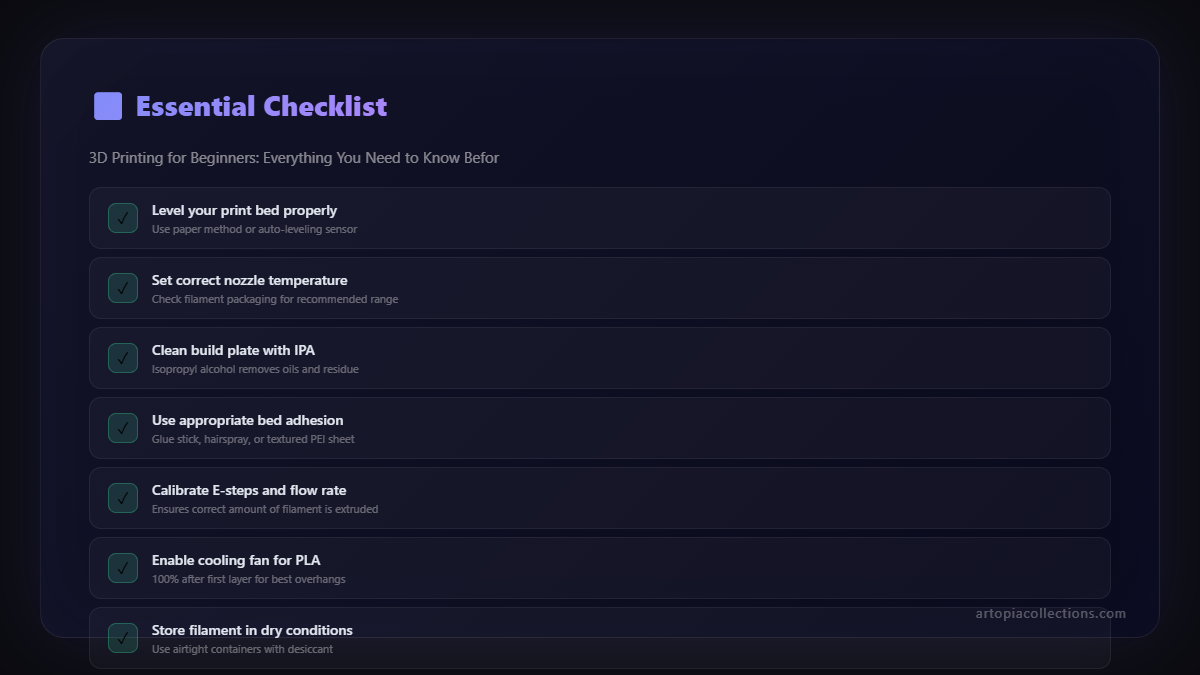
- Glue Stick: Just a regular old UHU or Fevicol MR glue stick. Apply a thin layer to your print bed. Cheap, effective, and easy to clean.
- Hairspray: L'Oréal Elnett is a popular choice, but any strong hold hairspray works. Spray a light mist on a *cold* bed.
- Masking Tape (Painters Tape): For some surfaces, this works wonders.
Most modern printers come with textured surfaces that actually do a decent job with just heat, but having an adhesion aid handy is a smart move. My printer often prints just fine on its glass bed with just heat, but for critical prints, I'll still slap some glue stick on there. Better safe than sorry, right?
Basic Toolkit: Your Printer's Best Friends
- Spatula/Scraper: To carefully pry prints off the bed.
- Side Cutters/Snips: For trimming filament and supports.
- Allen Keys/Wrenches: For assembly, maintenance, and tightening things. Your printer will likely come with these.
- Calipers (Digital is best!): Invaluable for measuring parts, filament diameter, and verifying dimensions. You can get a decent digital one for â¹500-â¹1000.
- Nozzle Cleaning Needles: For when your nozzle inevitably clogs.
- Pliers: Small needle-nose pliers are super helpful.
And speaking of clogs â don't panic! It happens to everyone. It's part of the learning process.
The Software Side: Where the Magic Begins
Okay, you've got your printer, your filament, and your tools. Now how do you tell the printer what to print?
CAD (Computer-Aided Design): Designing Your Dreams
This is where you create 3D models. Don't be intimidated! You don't need to be an engineer. For beginners, I always recommend:
- Tinkercad: It's free, web-based, and incredibly easy to learn. Great for basic shapes, combining objects, and simple designs. My kids even use it!
- Fusion 360: If you're serious about design and want to make functional parts, Fusion 360 (free for hobbyists and startups) is a powerful parametric CAD software. It has a steeper learning curve, but it's worth it.
Slicers: The Interpreter
This is the crucial step between your 3D model and your printer. A "slicer" program takes your 3D model (usually an .STL or .OBJ file) and "slices" it into hundreds or thousands of thin layers. It then generates G-code, which is basically a set of instructions that tells your printer exactly where to move, how hot to be, how fast to extrude, etc. It's like giving a recipe to your printer.
The most popular free slicers are:
- Cura (Ultimaker Cura): This is probably the most widely used and supported slicer. It's free, intuitive, and has profiles for almost every printer out there.
- PrusaSlicer: Another excellent free option, known for its advanced features and great print quality.
Just download one of these, set up your printer profile (most come with predefined profiles for popular machines), and you're good to go. You'll spend a lot of time in your slicer, tweaking settings. It's where you learn the nuances of printing.
Finding Models: If You Don't Want to Design
No worries if designing isn't your jam right away! There are massive online repositories of free 3D models:
- Thingiverse: The OG. Thousands of free models, but sometimes the quality varies.
- Printables by Prusa Research: My personal favourite now. High-quality models, a great community, and often better organization.
- MyMiniFactory: Another excellent source for well-curated models.
Download an .STL file, load it into your slicer, slice it, save the G-code to an SD card (or transfer via USB/Wi-Fi if your printer supports it), and insert it into your printer. Voila!
Your First Print: Patience, Young Padawan!
So, you've assembled your printer (hopefully!), downloaded your slicer, and found a cool model. Now for the moment of truth. What do you print first? A simple calibration cube (20x20x20mm) or a "Benchy" (a small 3D boat designed for testing) are excellent choices. They test various aspects of your printer.
The Golden Rule: Bed Leveling!
I mentioned auto-bed leveling earlier, and it's fantastic. But even with auto-bed leveling, you sometimes need to adjust your Z-offset (the distance between your nozzle and the print bed for the first layer). If your printer only has manual leveling, this will be your ritual. It needs to be perfect â not too close (nozzle scrapes the bed), not too far (filament doesn't stick). There are tons of guides and videos on YouTube for your specific printer. Don't skip this step! A poorly leveled bed is the #1 cause of failed prints for beginners.
Loading Filament & Temperature
Follow your printer's instructions for loading filament. Make sure the nozzle is preheated! For PLA, your nozzle temperature will typically be between 195-215ðC, and your bed temperature around 50-65ðC. Start with the middle of these ranges (e.g., 200ðC nozzle, 60ðC bed) and adjust as needed.
Observe, Learn, Adjust
Your first print might not be perfect. Mine certainly wasn't! Don't get discouraged. Watch what your printer is doing. Are the lines inconsistent? Is it stringing? Is the first layer peeling up? These are all common issues that have solutions. Google is your friend. YouTube is your guru. The community forums for your printer model are your support group.
My advice? Start small, be patient, and don't be afraid to fail. Each failed print is a lesson learned. And trust me, when you finally pull off that perfectly crisp first print, the feeling is absolutely glorious.
Maintenance: Keep Your Machine Happy
Just like any tool, your 3D printer needs a little love to keep it running smoothly.
- Clean Your Print Bed: After every few prints, wipe it down with isopropyl alcohol to remove grease and debris.
- Clean the Nozzle: Use a brass brush to remove any plastic buildup from the outside of the nozzle. For clogs, use those cleaning needles.
- Check Belts: Ensure your X and Y axis belts are taut, but not overly tight.
- Lubricate: Apply a thin coat of grease (like white lithium grease) to your Z-rod periodically.
These simple steps will prevent a lot of headaches down the road. It's not a lot of work, but it makes a huge difference in print quality and machine longevity.
Beyond the Basics: The Road Ahead
Once you've got the hang of PLA and your printer, a whole new world opens up. You can explore:
- Other Filaments: PETG for stronger parts, TPU for flexible items, ABS (a bit trickier to print) for heat resistance, even wood-filled or metal-filled filaments!
- Upgrades: New nozzles, improved hotends, silent mainboards, better fans â the upgrade path is endless.
- Advanced Slicer Settings: Digging deeper into retraction, infill patterns, support structures, and more to fine-tune your prints.
The 3D printing community is vibrant and incredibly helpful. Join some Facebook groups, check out local meetups (if available), and don't hesitate to ask questions. We've all been beginners!
Ready to Press Print?
So there you have it, folks! My comprehensive, no-nonsense guide to getting started with 3D printing here in India. It's a journey, not a destination, and it's filled with learning, challenges, and incredible satisfaction. Don't let the initial jargon scare you off. Dive in, choose a good starter printer, get some quality PLA, and prepare to be amazed by what you can create.
And hey, if you ever need some custom 3D printed items, or just want to see what's possible, don't forget to check out what we're cooking up at Artopia Collections. Happy printing, and I can't wait to see what you make!


