OnShape vs Fusion 360: Free Cloud CAD for 3D Printing Compared
This post dives into a head-to-head comparison of OnShape and Fusion 360, evaluating their features, usability, and suitability for 3D printing projects. Discover which free cloud-based CAD software is the better choice for your design workflow.
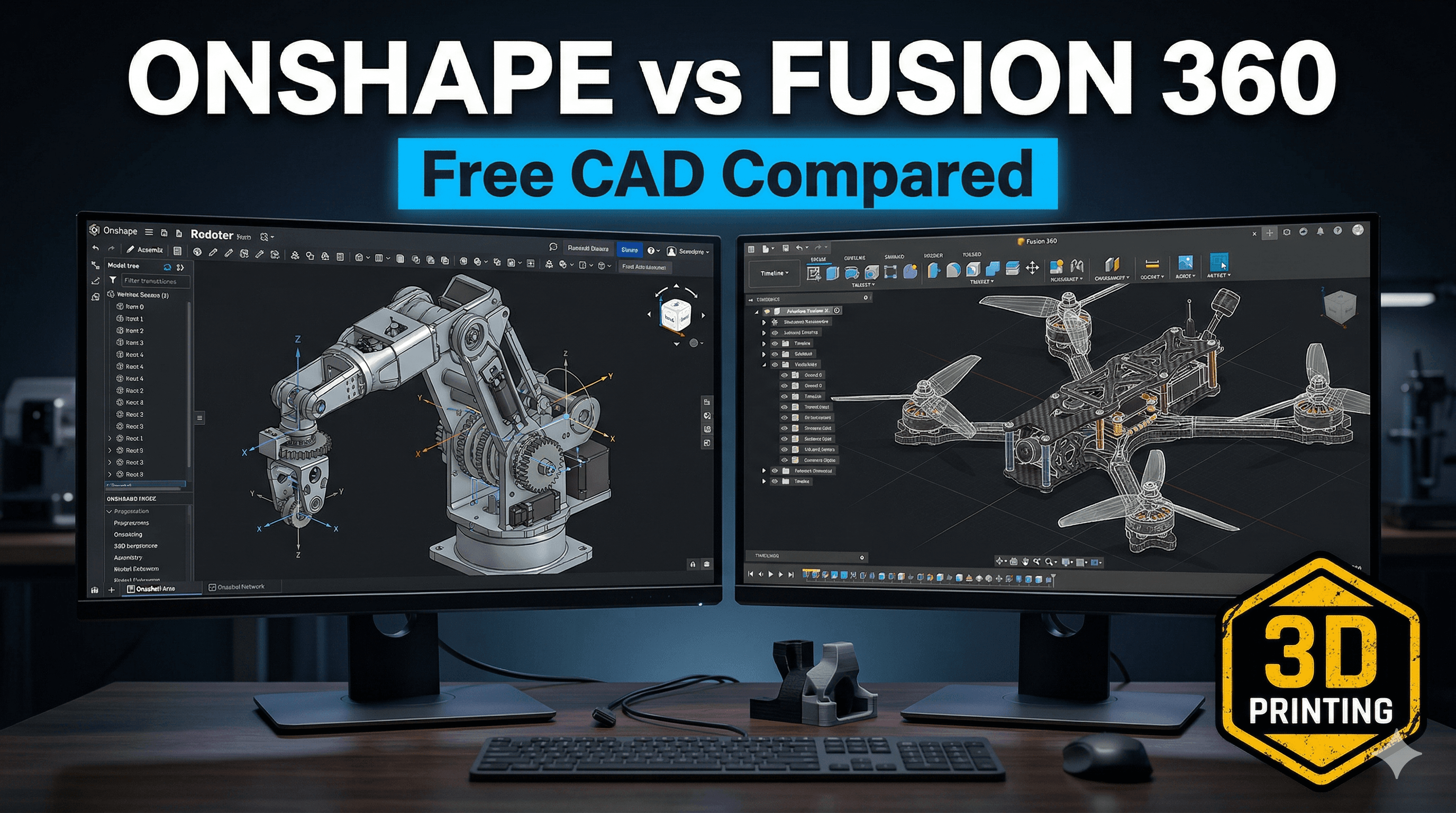
Chalo, let's talk shop, ya'll! If you're anything like me, a fellow 3D printing enthusiast, a maker, or someone trying to run a small design business right here in India, you've probably faced the same existential crisis I did: Which free CAD software do I use? And by free, I mean genuinely free, not "free for 30 days then give me your kidney" free. Because let's be honest, every rupee saved on software is a rupee you can spend on more glorious filament or perhaps a nozzle upgrade for your beloved printer, right?
For years, years I tell you, I’ve been wrestling with this question. Back when I first got my grubby little hands on a Creality Ender 3 (man, that thing has seen some mileage!), I knew I couldn't just download models from Thingiverse forever. I wanted to design my own stuff. My own enclosures for Raspberry Pis, custom desk organisers for my chaotic workspace, even some intricate pieces for my small business, Artopia Collections, where we turn digital dreams into tangible art.
And that's where the big two, the Goliaths of cloud-based CAD for hobbyists, enter the arena: Fusion 360 and Onshape. Both promise the moon, both let you design complex parts from the comfort of your home (or chai stall, if your laptop battery lasts!), and both have their passionate devotees. But which one is truly right for us, the folks tinkering in humid Indian weather, maybe with a slightly patchy internet connection, trying to make beautiful things? Let's dive in.
Fusion 360: My Old Friend (with a Complicated Relationship)
Ah, Fusion 360. Autodesk's darling. For a long time, this was my go-to. And for good reason! When I first picked it up, probably around 2017-2018, its free hobbyist license was incredibly generous. I mean, seriously, it was a full-fledged parametric CAD software with CAM capabilities, simulation tools, rendering – the whole shebang – for absolutely nothing. It felt like I'd found a cheat code for creativity.
What I loved about it (and still do, mostly):
- Powerhouse: Honestly, the feature set in Fusion 360 is incredible. For 3D printing, you've got robust parametric modeling, direct modeling for pushing and pulling faces, and even mesh tools for cleaning up STL files. It handles complex assemblies like a champ.
- Integrated CAM: If you ever dabble in CNC machining (and I have, a little bit, mostly for making custom jigs), having CAM built right in is a godsend. No exporting, no separate software. Sweet!
- Massive Community: The number of tutorials on YouTube, the forums, the sheer volume of resources for Fusion 360 is staggering. If you get stuck, chances are someone, somewhere, has already solved your problem and posted a video about it. This was a HUGE help when I was learning, trying to figure out how to do a loft or a sweep for a particularly tricky model.
- Local Files (mostly): While it's cloud-enabled, you work on files locally, and they sync to the cloud. This means if your internet drops for a bit (ahem, welcome to India sometimes!), you can usually keep working without losing your progress immediately.
Now, for the "complicated relationship" part...
The thing is, Autodesk has been playing a bit of a cat-and-mouse game with its free hobbyist license for Fusion 360. It used to be fantastic, then they started imposing limitations. First, it was the number of active projects, then some advanced CAM features were restricted, then the number of exports per month. It's frustrating, honestly. You get comfortable, you build a workflow around it, and then BAM! A feature you relied on is suddenly behind a paywall.
As a small business owner, even a tiny one like Artopia Collections, these changes make me nervous. I can't build my business entirely on a foundation that keeps shifting. The full commercial license for Fusion 360 is, well, it's not cheap, especially for us here. We're talking around ₹35,000 to ₹40,000 per year for a single user. That's a significant chunk of change for someone just starting out, or even someone established but working on a tight margin. That money could buy me, what, nearly 20-25 kg of good quality eSUN PLA+ filament? Or put a decent down payment on a new Anycubic Kobra printer!
So, while I still use Fusion 360 for some legacy projects or when I need its specific advanced features, I've started looking elsewhere more seriously, especially for new designs and collaborative projects.
Onshape: The True Cloud Native (and My New Crush?)
Enter Onshape. This one's a different beast altogether. While Fusion 360 is a desktop application that uses the cloud for storage and collaboration, Onshape is, from the ground up, a browser-based, cloud-native CAD system. No downloads, no installations, nothing. You just open your web browser, log in, and you're good to go.
What makes Onshape shine (especially for folks like us):
- Truly Cloud-Native: This is its superpower. I can literally start a design on my desktop, pick it up on my laptop, make a tweak on my phone during my commute (yeah, I'm that kinda crazy), and even show a client a live model on their tablet. No file transfers, no "did I save the latest version?" headaches. It's all just there, in the cloud, always the latest version. This is incredibly liberating.
- Real-time Collaboration: Fusion 360 has collaboration, but Onshape takes it to another level. Multiple people can work on the *same document, at the same time*. It’s like Google Docs for CAD. I've had situations where I'm explaining a design concept to a friend (who's also into 3D printing) over a video call, and we're both making changes live. It's wild, and it saves so much time.
- No Hardware Worries: Since it runs in your browser, the heavy lifting is done on Onshape's servers. This means you don't need a beastly gaming rig to run it smoothly. My older laptop, which groans under Fusion 360, handles Onshape like a breeze. This is a massive plus for small businesses or hobbyists who can't invest ₹1 lakh+ in a high-end workstation. All you need is a decent internet connection.
- Version Control: Oh my god, the version control is incredible. Every single change you make is tracked. You can revert to any previous state, branch off a design to try a new idea without messing up the main one, and merge changes back. It's like Git for CAD, and it's built-in, seamless, and just works.
But, here's the deal with Onshape's free tier:
Onshape offers a free "Community" plan, which is fantastic for hobbyists and learning. The catch? All your designs are public. Yes, public. Anyone can see them, copy them, modify them. For personal projects, open-source designs, or just learning, this is perfectly fine. It's actually a great way to share your work and get feedback.
However, for a small business like Artopia Collections, where I'm designing custom pieces for clients or creating proprietary designs, making everything public isn't really an option. I mean, I wouldn't want someone to just download my latest intricate lamp design and start selling it before I even launched it, right? The paid plans for Onshape, like their Standard plan, offer private documents, but again, that comes with a subscription fee. It's typically priced similarly to Fusion 360's commercial license, sometimes a bit more.
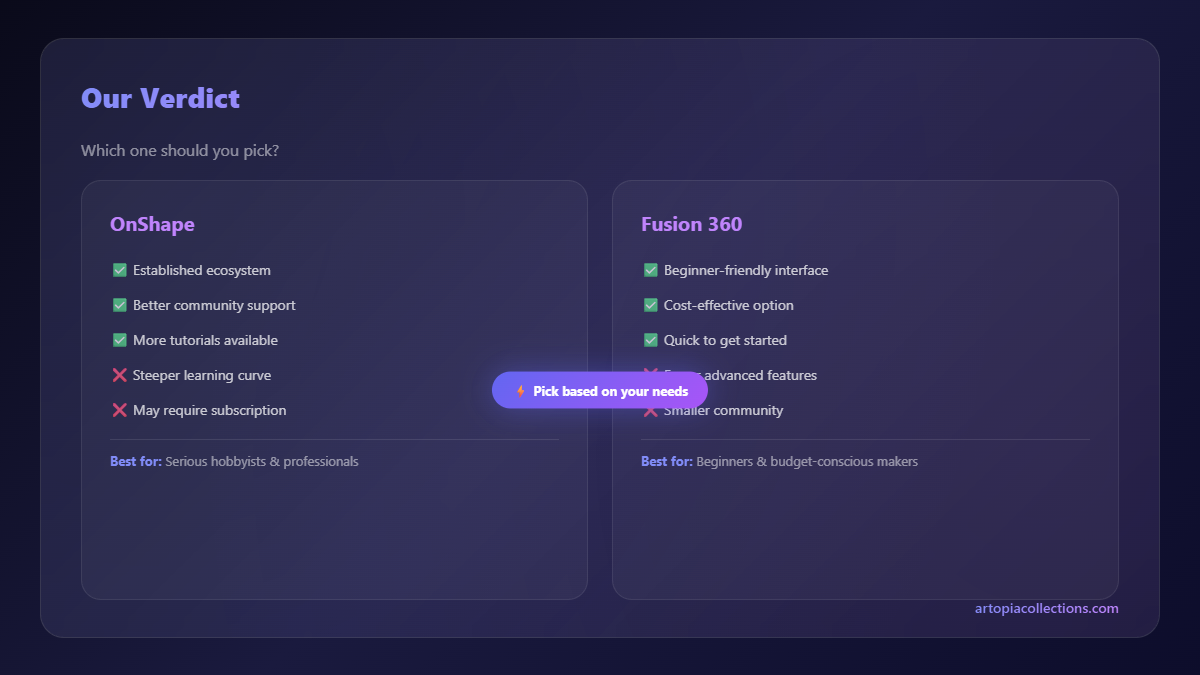
So, Onshape vs. Fusion 360: The Head-to-Head Battle for 3D Printing
Alright, time for the showdown. For someone like you and me, specifically for 3D printing, which one truly wins?
1. Free Tier Reality:
- Fusion 360: Free for hobbyists, but with increasing restrictions and ambiguities. You get private documents, which is a big plus for personal projects or even some low-key commercial work that doesn't push the feature limits. But the constant changes are a concern.
- Onshape: Genuinely free, full features, but all documents are public. If privacy is not an issue (e.g., you're sharing open-source designs or just learning), it's phenomenal.
My take: For pure hobbyist learning and open-source sharing, Onshape's free tier is more robust and transparent. For *private* hobbyist projects where you just want to design your own stuff without sharing it, Fusion 360 (for now) still has an edge due to private documents, despite its feature limitations.
2. Ease of Use & Learning Curve:
- Fusion 360: It feels like a very traditional CAD package, which can be comfortable if you've used SolidWorks or similar. The interface is clean, but it has a lot of features, so it can be overwhelming initially.
- Onshape: The interface is also very clean, perhaps even more modern and streamlined. Because it's browser-based, it feels a bit snappier sometimes. If you're new to CAD, I actually think Onshape's approach to direct manipulation and features might be slightly easier to grasp for some people, purely because of its browser-based fluidity.
My take: It's subjective. If you've got a background in traditional CAD, Fusion 360 might feel more familiar. If you're completely new, Onshape might offer a slightly smoother, less intimidating entry point due to its modern UI and less reliance on installations. Both have excellent tutorial resources.
3. Collaboration & Version Control:
- Fusion 360: Good cloud saving, decent collaboration features for sharing and commenting, but not truly real-time co-editing. Version control is there, but not as granular or intuitive as Onshape.
- Onshape: Clear winner here. Real-time collaboration, comprehensive, effortless version control, branching, merging – it's all baked in and works brilliantly.
My take: If you ever plan to work with others on a design, even casually, Onshape is miles ahead. For my business, when I occasionally need to share a design concept with a client or another designer for feedback, Onshape's live sharing is invaluable.
4. Performance & Hardware Requirements:
- Fusion 360: Requires a decent desktop or laptop. It can be a resource hog, especially with complex assemblies or when rendering. You'll want a dedicated GPU and a good processor for a smooth experience.
- Onshape: Runs entirely in your browser. This means it's much lighter on your local machine. If you have an older laptop or a Chromebook, Onshape will likely perform better. The main requirement is a stable internet connection.
My take: This is a big one for us in India, where not everyone has a top-tier gaming PC. Onshape wins hands down if your hardware isn't cutting edge. But, if your internet connection is unreliable, Fusion 360's local file processing can be an advantage.
5. 3D Printing Specific Features:
Both are excellent for designing parts for 3D printing. They both handle parametric modeling, sketches, extrusions, revolves, fillets, chamfers – all the bread and butter stuff you need. Exporting to STL is standard in both. Fusion 360 might have a slight edge in direct mesh editing tools, which can be handy for repairing downloaded STLs before slicing, but Onshape is constantly adding features too.
My take: It's a tie for basic 3D printing design. Both are more than capable. You'll quickly get your head around creating printable models in either.
My Personal Workflow & Recommendation for Artopia Collections
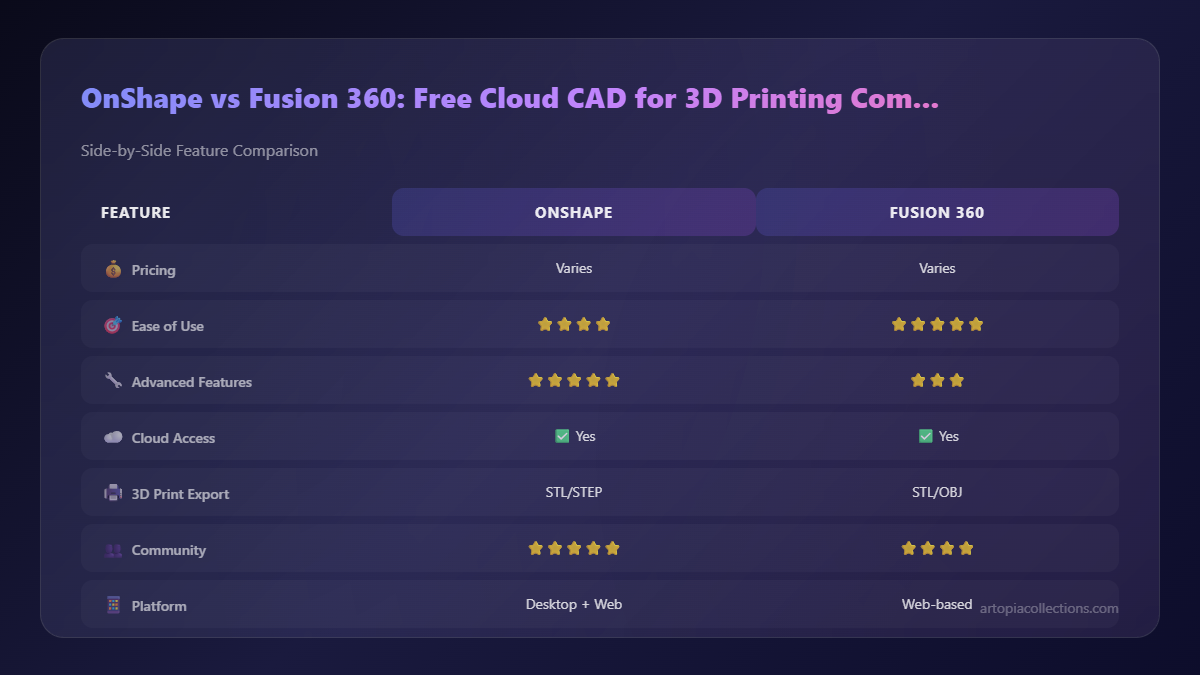
So, where do I land as someone who runs Artopia Collections and loves to tinker? Honestly, it's a bit of a hybrid approach for me right now. For proprietary designs that are central to my business and I absolutely cannot share publicly, I tend to use Fusion 360, carefully managing the free tier's limitations. It’s an investment of my time to learn its quirks, but the private documents are a non-negotiable for some projects.
For educational content, open-source models, or quick collaborative projects where privacy isn't an issue, Onshape is my champion. Its speed, browser-based accessibility, and incredible version control make it a joy to use. I can literally design something, share a link, and get feedback instantly. It's also fantastic for prototyping ideas quickly without the mental overhead of installations or file management.
If you're just starting out and purely doing hobbyist work, especially if you're interested in sharing your designs or working with others, I'd strongly recommend giving Onshape a try. It’s free, powerful, and a breath of fresh air.
If you need private documents and don't mind the desktop installation and potential future limitations, Fusion 360 is still a powerhouse for individual creators. You can download it directly from Autodesk's website.
Here’s the thing, folks: don't get stuck in analysis paralysis. Both are incredible tools. The best way to figure out which one clicks with you is to actually dive in and try them. Spend a few hours on each, go through some basic tutorials, and see which interface feels more intuitive, which workflow resonates with you. You can find excellent quality PLA filaments for your journey, check out some options here: Good PLA Filament on Amazon.in. And if you’re looking to upgrade your machine or get started with one, you can find various 3D printer options as well: 3D Printers on Amazon.in.
Ultimately, it's about what helps you bring your ideas to life. Whether it’s designing a custom part for your bike, creating a unique piece of home decor, or building a small business like Artopia Collections, these tools are gateways to making. So go on, start designing!


