How to Sell 3D Printed Products on Flipkart Seller Hub
Ready to monetize your 3D printing skills? This guide will walk you through the entire process of selling your custom 3D printed products on Flipkart's Seller Hub, from setup to successful sales.
Turning Filament Dreams into Flipkart Sales: My Journey with 3D Printed Products!
You know that feeling, right? The whirring of your 3D printer, the smell of warm PLA, watching layer by painstaking layer as a digital design materializes into something tangible. It's pure magic, isn't it? For so long, my little Creality Ender 3 V2 and later my Anycubic Kobra were just expensive hobbies, churning out fidget toys for friends, replacement parts for things around the house, and a gazillion iterations of "functional prints" that usually just sat on a shelf. But then, a thought sparked: what if this passion could actually pay for itself? What if I could turn those plastic creations into something more? That's when I decided to take the plunge and explore selling 3D printed products on Flipkart Seller Hub.
Honestly, it felt a bit overwhelming at first. I mean, selling something I made in my living room on a platform as huge as Flipkart? It seemed like a whole different ballgame from just sharing cool prints on Instagram. But with a bit of research, a lot of trial and error (oh, the errors!), and a stubborn refusal to give up, I slowly started to figure it out. And you know what? It's been one of the most rewarding experiences. So, if you're like me, a fellow Indian 3D printing enthusiast with a mountain of ideas and a desire to make your machines earn their keep, pull up a chair. I'm going to walk you through how I navigate Flipkart Seller Hub, and hopefully, help you get your own business off the ground.
Why Flipkart? And Why Now?
Look, we live in India, and while Amazon is huge, Flipkart has its own massive user base, especially for certain product categories. It's truly a homegrown giant, and for small businesses like ours, it offers incredible reach. The thing is, the market for 3D printed products, while niche, is growing. People are looking for unique, customizable, and often functional items that aren't mass-produced. And that's exactly where we come in!
When I first started Artopia Collections (yeah, that's the fancy name I came up with for my little venture – you can check out some of our stuff over at Artopia Collections if you're curious!), I really didn't know what to expect. My initial idea was just to sell some cool planters and maybe a few desktop organizers. But the response, even if small at first, was incredibly encouraging. It proved there's a demand, and Flipkart provides the stage.
Getting Your Foot in the Door: Registering on Flipkart Seller Hub
 Alright, let's get down to the brass tacks. The first step, obviously, is to register as a seller. And I won't lie, this part can feel a bit like navigating government bureaucracy sometimes, but it's totally doable. Here's what you'll generally need:
- GSTIN: Yes, you need a GST number. If you're serious about selling, even as a small business, this is non-negotiable for most online platforms in India. It sounds scarier than it is; you can get one relatively easily these days.
- Bank Account: A current account linked to your business. Flipkart needs a place to send all that hard-earned money!
- Pan Card: Your personal PAN card for identity verification.
- Address Proof: For your business.
Once you have these documents sorted, head over to the Flipkart Seller Hub website. The registration process itself is fairly guided. You'll input your business details, upload the necessary documents, and go through a verification process. It took me a few days, maybe a week, for everything to be approved. Just be patient and make sure all your documents are clear and correctly uploaded. Trust me, it's worth the initial hassle.
What to Sell? Nailing Your Niche and Pricing Strategy
This is where the fun (and sometimes the frustration) really begins! What should you actually print and sell? In my experience, the key is to find a balance between popular demand, what your printers can handle efficiently, and what you genuinely enjoy making.
Some categories that have worked well for me and others I know include:
- Home Decor: Unique planters, vases (especially aesthetic ones with interesting textures), lamp shades, coasters. People love quirky stuff for their homes.
- Desk Organizers: Pen holders, cable management clips, earphone stands, custom phone stands. Everyone wants a tidy workspace.
- Figurines & Collectibles: Gaming characters, movie props, intricate showpieces. This requires good detail and often higher print quality.
- Customizable Products: This is a big one! Nameplates, personalized gifts, custom lithophanes. If you can offer personalization, you're golden.
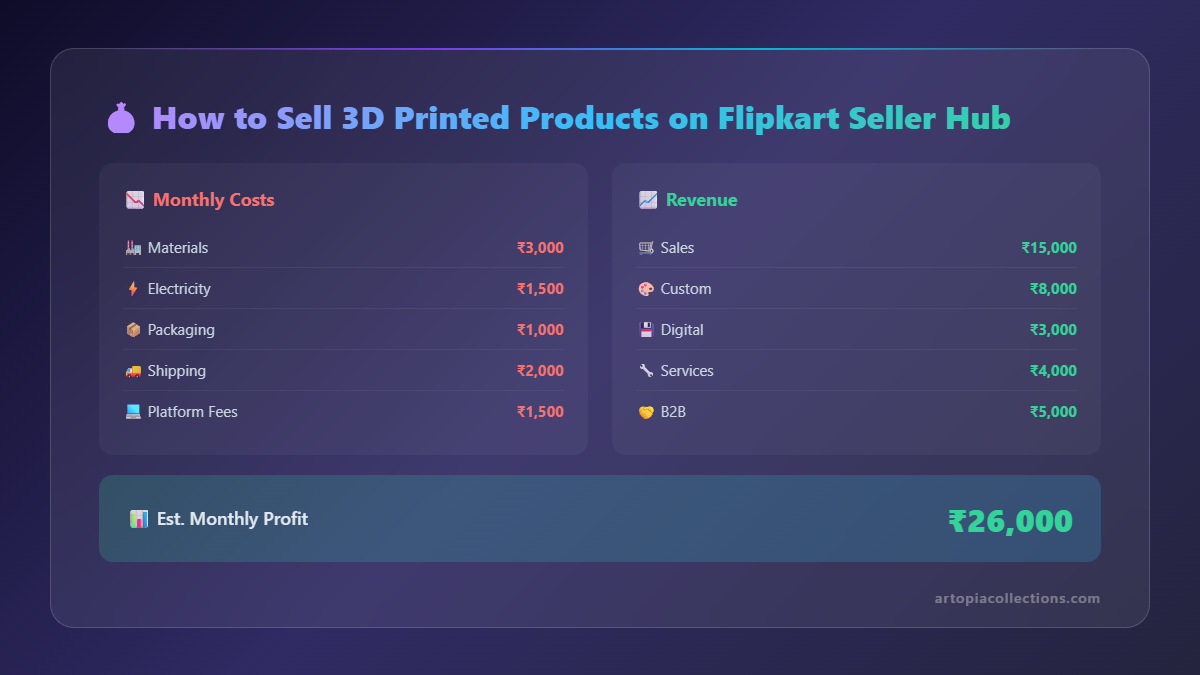
Personally, I found a sweet spot with decorative planters and some functional desk accessories. They print relatively quickly, use a decent amount of filament, and have a broad appeal. For instance, a medium-sized hexagonal planter might take 6-8 hours to print and use about 150-200 grams of good quality PLA filament, which, at an average cost of say, ₹1500 per kg (for brands like eSUN or Overture), means your material cost is roughly ₹225-₹300. You then add your electricity cost (minimal for most printers), print time as labor, design cost if it's your own model, and of course, your profit margin. I'd typically sell that planter for anywhere between ₹500-₹850, depending on size and intricacy. You have to factor in Flipkart's commission too, which varies by category but is usually around 5-15%.
Don't be afraid to experiment! Print a few prototypes, see how they look, feel, and how long they take. Ask your friends for their honest opinions. Market research here means observing what sells well on other platforms (even international ones like Etsy) and adapting those ideas for the Indian market, always adding your unique twist.
Crafting the Perfect Listing: Your Product's Online Showroom
 This is arguably the most crucial step after having a great product. Think of your listing as your shop window. If it's dull, nobody's coming in, right?
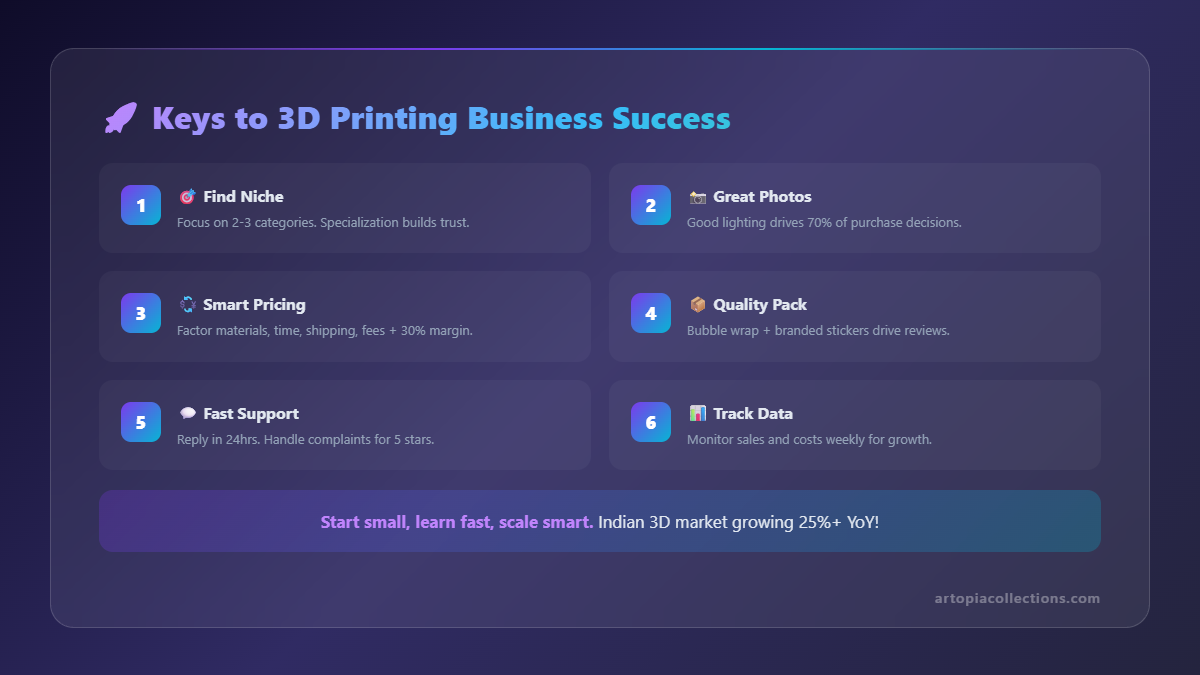
1. Photography is King (or Queen!)
Seriously, I can't stress this enough. People buy with their eyes. Your 3D prints need to look fantastic.
- Good Lighting: Use natural light if possible, or invest in a simple light box.
- Clean Background: A plain white or light-colored background works wonders. No clutter!
- Multiple Angles: Show off your product from all sides.
- Scale Shots: Include an item for scale (like a coin, a pen, or even a hand) so buyers can judge the size.
- Lifestyle Shots: Show the product in use! A planter with a plant in it, an organizer on a desk. This helps buyers visualize it in their own space.
I personally use my phone camera (a good one, thankfully!) and some basic editing apps. You don't need fancy DSLR gear to get good photos, just good technique and a bit of patience.
2. Descriptions That Sell
Once you've hooked them with photos, reel them in with compelling descriptions.
- Be Specific: What material is it (PLA, PETG, ABS)? What are the exact dimensions?
- Highlight Features: Is it biodegradable? Lightweight? Durable?
- Use Cases: What's it for? (e.g., "Perfect for succulents," "Ideal for decluttering your workspace").
- Care Instructions: Can it be washed? Is it heat sensitive?
- Personal Touch: Briefly mention it's 3D printed, perhaps even a bit about the process or the unique design.
Also, think about keywords. What would someone search for if they wanted your product? "3D printed planter," "geometric vase," "custom nameplate," "desk organizer." Sprinkle these naturally into your title and description.
3. The Dreaded Category Selection
Okay, this is where it can get a bit tricky for 3D printed items. There isn't a direct "3D printed goods" category on Flipkart (or most platforms, for that matter). You'll have to find the closest fit. For my planters, I usually go with "Home & Kitchen > Home Decor > Vases & Planters." For desk items, it might be "Home & Kitchen > Storage & Organization > Desk Organizers." Sometimes, you might have to dig around a bit to find the best, most relevant category. Getting it wrong can mean fewer eyes on your product, so choose wisely.
Shipping, Logistics, and the Flipkart Advantage
One of the biggest reasons I opted for Flipkart (and most other major platforms in India) is their robust logistics network. As a small seller operating out of a home, handling shipping logistics myself would be a nightmare. Flipkart manages the pick-up and delivery for you. Here's how it generally works:
- A customer places an order.
- You get a notification on your Seller Hub dashboard.
- You package the product (securely, please! 3D prints can be delicate).
- You download and print the shipping label from the dashboard and stick it on the package.
- Flipkart's logistics partner (e.g., Ekart) comes to your doorstep to pick up the package.
- They handle the rest – tracking, delivery, and all the associated headaches.
It's incredibly convenient. You just need to ensure your products are ready to be picked up on time. Delays can impact your seller rating, which is something you definitely want to keep high.
Dealing with Challenges (Because They Will Come!)
No business journey is smooth sailing, and selling 3D prints has its own set of unique challenges:
- Quality Control: Every print is unique. You need a strict QC process. Check for layer lines, stringing, warping, bed adhesion issues. Only ship perfect prints.
- Returns & Damages: Sometimes, despite your best efforts, a product might arrive damaged, or a customer might simply not like it. Handle returns professionally and promptly. It builds trust.
- Inventory Management: Do you print-on-demand or keep a small stock? For custom items, print-on-demand is obvious. For popular standard items, I usually keep a few ready to ship to reduce lead time.
- Pricing Pressure: The market can be competitive. Don't undersell yourself, but be realistic. Remember to factor in your time, materials, electricity, and platform fees.
My biggest hiccup early on was underestimating packaging. A beautiful vase I spent 12 hours printing arrived at the customer's end cracked. It was heartbreaking, but a valuable lesson. Now, I use sturdy cardboard boxes, lots of bubble wrap, and even some shredded paper or old newspaper for extra cushioning. Better safe than sorry, especially when you consider the cost of filament and your time!
Scaling Up and Staying Inspired
Once you get the hang of things, you might start thinking about scaling up. This could mean:
- More Printers: A farm of Ender 3s or even one faster CoreXY machine could boost production.
- More Materials: Experimenting with different filaments like PETG for durability, or wood-filled PLA for unique aesthetics.
- Expanding Product Range: Adding new designs and categories.
- Marketing: Beyond Flipkart, consider promoting your products on social media (Instagram, Facebook) to drive traffic to your listings.
The beauty of 3D printing is the endless possibilities. New filaments, new printer technologies, and new design trends are constantly emerging. Stay curious, keep learning, and keep experimenting. Follow designers on social media, browse sites like Printables or Thingiverse for inspiration (and maybe even sell models you design yourself!).
My Two Cents
Starting Artopia Collections on Flipkart wasn't just about making money; it was about validating a passion. It's about seeing something I designed and created with my own hands find a home in someone else's. It's challenging, yes, and there are days you just want to throw your printer out the window (we've all been there with that clogged nozzle, haven't we?). But the satisfaction of a positive customer review, or seeing an order notification pop up, makes it all worth it.
So, if you're on the fence, I say go for it! Do your research, prepare your documents, take fantastic photos, and be patient. The world of 3D printing is expanding rapidly, and there's a place for your unique creations in the Indian market. Who knows, maybe one day, our 3D printed products will be sharing a virtual shelf on Flipkart!