Prusa XL vs Bambu Lab X1 Carbon: Multi-Tool vs AMS Approach
Explore the fundamental differences between the Prusa XL's multi-tool system and the Bambu Lab X1 Carbon's AMS for multi-material 3D printing. Discover which innovative approach best suits your needs and workflow.
Artopia Collections Blog Team6 July 202612 min read

Prusa XL vs. Bambu Lab X1 Carbon: The Multi-Tool vs. AMS Rumble!
Man, I gotta tell you, there's nothing quite like the rush of a successful multi-color print. That moment when the layers finally click into place, colors blending just so, and you pull a vibrant, complex object off the build plate? Pure magic. But let's be real, getting there can be a journey, often paved with frustration, spaghetti monsters, and enough wasted filament to build a small fort. And lately, for us small business owners in India trying to deliver awesome custom prints, the biggest question echoing in my workshop has been: which path to multi-color nirvana is the right one? The meticulous, engineering-marvel Prusa XL with its true multi-tool approach, or the blazing-fast, consumer-friendly Bambu Lab X1 Carbon with its clever AMS system? Honestly, this isn't just about picking a printer; it's about two fundamentally different philosophies battling it out for dominance in our ever-evolving 3D printing world. And as someone running ArtOPIACustoms, where every rupee and every print matters, I've spent countless hours – probably too many, my wife would say – weighing the pros and cons. So, let's dive into this, friend.The Bambu Lab X1 Carbon: The Speed Demon with an Automated Sidekick
Look, when the Bambu Lab X1 Carbon hit the scene, it was like a meteor. Suddenly, everyone was talking about sub-20-minute Benchy prints and multi-color models that didn't take an eternity. I remember seeing the first videos, thinking, "No way! Is this for real?" And then it landed here in India, and the hype was... well, justified for many. The core of Bambu's multi-color offering is the AMS, or Automatic Material System. It's this sleek, stackable box that holds four spools of filament, automatically feeding and retracting them through a single print head. It's brilliant in its simplicity, honestly. You load up your colors, design your model in Bambu Studio, assign materials, and off it goes. The magic happens at the hotend. When it needs to switch colors, the printer retracts the current filament, purges the nozzle (meaning it squirts out a bit of the old color to make sure the new one is pure), loads the new filament, and continues printing.The Good Stuff (Why I like it for certain jobs):
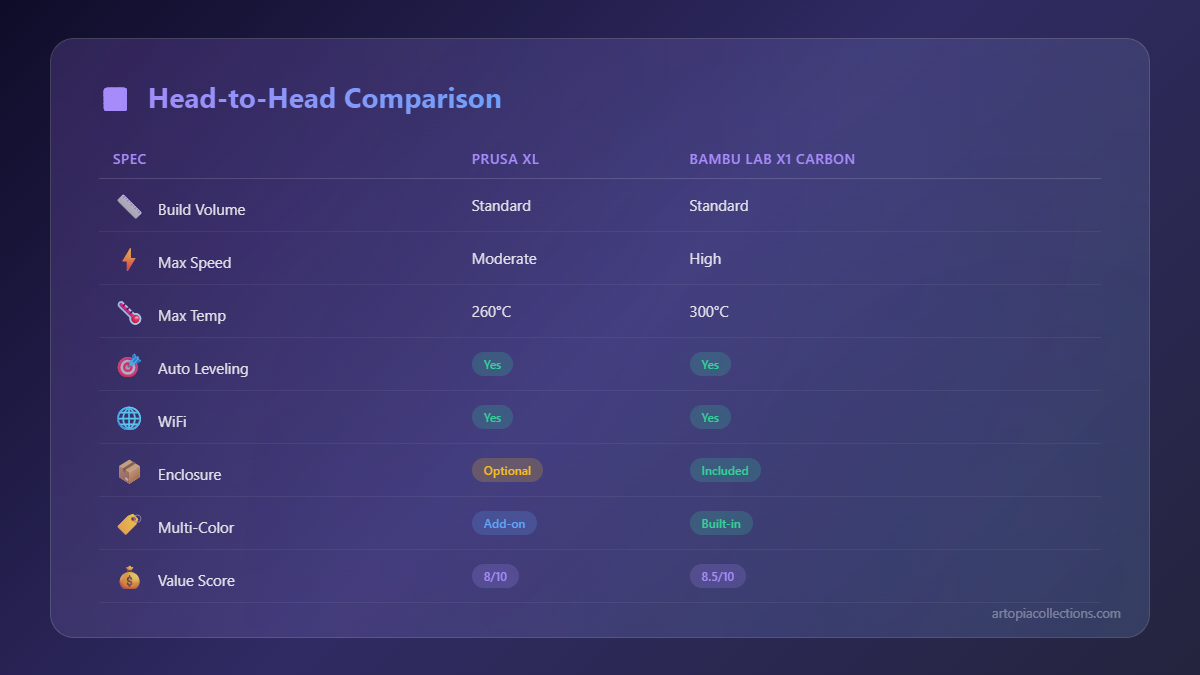
- Speed, glorious speed: Oh my god, this thing is fast. For quick prototypes, small batches of multi-color keychains, or anything where I need to iterate quickly, the X1 Carbon just flies. It's a significant leap over anything I've used before in this price range.
- User-friendly: Setting up multi-color prints is surprisingly intuitive. Bambu Studio is robust, and the AMS integration is seamless. It's a true "appliance" printer, meaning it just *works* most of the time without too much tinkering.
- Cost-effective multi-color: A Bambu Lab X1 Carbon combo (with one AMS unit) currently sits somewhere around ₹1.2 to ₹1.5 Lakhs here in India. For that price, you're getting a fully enclosed, high-speed, multi-color capable machine. That's a huge deal for a small business like mine trying to offer vibrant products without breaking the bank. You can even stack up to four AMS units for 16 colors, which is wild!
- Enclosure for advanced materials: The built-in enclosure and active heating help a lot with materials like ABS, ASA, or even some Nylon blends, which is critical for functional parts.
But Here's the Catch (My Reservations):
- The dreaded poop chute: Every time the printer switches colors, it purges filament. This means a little blob of plastic (or a "poop," as the community affectionately calls it) gets pushed out into a waste bin. It adds up. For complex multi-color prints, I've seen kilograms of wasted filament just from purging. While the printer tries to minimize this with clever flushing into infill or specific purge blocks, it's still waste. And when you're buying good quality filament like eSUN PLA+ (check it out on Amazon.in, it's pretty solid), that waste hits your bottom line.
- Material limitations: Because it's a single nozzle system, you're generally restricted to printing filaments with similar print temperatures and characteristics in a single print. Mixing PLA with PETG, or even worse, with Nylon or TPU, is usually a recipe for disaster. The residual material in the nozzle from the previous filament can cause clogs or poor adhesion when the next, incompatible material tries to extrude.
- Proprietary parts: Bambu Lab is a closed ecosystem. While their parts are generally good, it means you're tied to them for replacements, upgrades, and even certain filament types. For a tinkerer like me, that's a bit of a psychological barrier.
- Toolhead swaps: If you *do* want to print with very different materials (like abrasive carbon fiber PLA and then regular PLA), you're looking at manually swapping out the entire hotend assembly. It's tool-less, which is nice, but it's not automated within a single print.
The Prusa XL: The Engineering Masterpiece with a Tool Changer
Now, let's talk about the Prusa XL. This isn't just a printer; it's a statement. It's a culmination of years of iterative design and Prusa's commitment to open-source innovation. And boy, is it different from the Bambu. The XL's multi-material approach is centered around its *tool changer*. Instead of one nozzle doing all the work and purging, the XL literally has multiple independent tool heads, each with its own hotend and nozzle. When it needs a different color or material, it parks the current tool head and picks up another one.The Vision (Why it excites me):
- True multi-material, zero purge: This is the holy grail. Each tool head is a dedicated print head. So, if I'm printing a part with PLA and then need a flexible TPU gasket, I can have one tool head loaded with PLA and another with TPU. When the printer switches, there's no residual material to purge. That means virtually *zero* filament waste from color changes. This is massive for long, complex prints or for expensive engineering filaments.
- Mixing materials and nozzle sizes: Imagine printing a strong structural part with a 0.6mm nozzle using PETG-CF, then immediately switching to a 0.25mm nozzle to print fine details in PLA, and then adding some soft TPU elements. The XL can do that in a single print. This opens up possibilities that were simply impossible or incredibly cumbersome before.
- Scalability and modularity: The XL is designed to be future-proof. You can buy it with one tool head (which is significantly cheaper, around ₹2.5-3 Lakhs here, though prices fluctuate wildly) and upgrade it to two or even five tool heads later on. A fully loaded 5-tool XL can easily run you upwards of ₹4.5-5 Lakhs, which is a serious investment. But it’s an investment that grows with your business.
- Prusa's legendary reliability and support: In my experience, Prusa printers are workhorses. They're designed to be tinkered with, understood, and repaired. The community support is phenomenal, and Prusa's own support is top-notch. For a business, this translates to minimal downtime.
- Large build volume: At 360x360x360mm, the XL offers a substantial build volume, perfect for larger functional prototypes or batches of bigger items.
The Reality Check (Where it makes me pause):
- Price of admission: Let's be blunt: a multi-tool XL is expensive. Like, seriously expensive for an Indian small business. Even the base single-tool version is a significant outlay. When you're comparing that to a Bambu, the financial leap is substantial.
- Speed (or lack thereof): While the XL has features like a next-gen extruder and input shaper for faster printing, the tool changes themselves are not instantaneous. The printer has to park a tool, pick up another, prime it, and then resume printing. This adds time, especially on prints with frequent color/material changes. It's a trade-off: less material waste, but potentially more time per print.
- Complexity: Setting up and calibrating multiple tool heads is inherently more complex than a single-nozzle system. There are more moving parts, more points of potential failure, and a steeper learning curve to truly master the machine. It requires patience and a willingness to dive deep into settings.
- Footprint: It's a big printer. You need dedicated space for it in your workshop.